OpenGL
Example of OpenGL program
The following example is from the OpenGL Red Book and its example code [1] [2].
References/triangles.vert
#version 400 core

layout( location = 0 ) in vec4 vPosition;

void
main()
{
    gl_Position = vPosition;
}
References/triangles.frag
#version 450 core

out vec4 fColor;

void main()
{
    fColor = vec4(0.5, 0.4, 0.8, 1.0);
}
References/01-triangles.cpp
  1//////////////////////////////////////////////////////////////////////////////
  2//
  3//  Triangles.cpp
  4//
  5//////////////////////////////////////////////////////////////////////////////
  6
  7#include "vgl.h"
  8#include "LoadShaders.h"
  9
 10enum VAO_IDs { Triangles, NumVAOs };
 11enum Buffer_IDs { ArrayBuffer, NumBuffers };
 12enum Attrib_IDs { vPosition = 0 };
 13
 14GLuint  VAOs[NumVAOs];
 15GLuint  Buffers[NumBuffers];
 16
 17const GLuint  NumVertices = 6;
 18
 19//----------------------------------------------------------------------------
 20//
 21// init
 22//
 23
 24void
 25init( void )
 26{
 27    glGenVertexArrays( NumVAOs, VAOs ); // Same with glCreateVertexArray( NumVAOs, VAOs );
 28      // https://stackoverflow.com/questions/24441430/glgen-vs-glcreate-naming-convention
 29    // Make the new VAO:VAOs[Triangles] active, creating it if necessary.
 30    glBindVertexArray( VAOs[Triangles] );
 31    // opengl->current_array_buffer = VAOs[Triangles]
 32
 33    GLfloat  vertices[NumVertices][2] = {
 34        { -0.90f, -0.90f }, {  0.85f, -0.90f }, { -0.90f,  0.85f },  // Triangle 1
 35        {  0.90f, -0.85f }, {  0.90f,  0.90f }, { -0.85f,  0.90f }   // Triangle 2
 36    };
 37
 38    glCreateBuffers( NumBuffers, Buffers );
 39
 40    // Make the buffer the active array buffer.
 41    glBindBuffer( GL_ARRAY_BUFFER, Buffers[ArrayBuffer] );
 42    // Attach the active VBO:Buffers[ArrayBuffer] to VAOs[Triangles]
 43    // as an array of vectors with 4 floats each.
 44    // Kind of like:
 45    // opengl->current_vertex_array->attributes[attr] = {
 46    //     type = GL_FLOAT,
 47    //     size = 4,
 48    //     data = opengl->current_array_buffer
 49    // }
 50    // Can be replaced with glVertexArrayVertexBuffer(VAOs[Triangles], Triangles,
 51    // buffer[ArrayBuffer], ArrayBuffer, sizeof(vmath::vec2));, glVertexArrayAttribFormat(), ...
 52    // in OpenGL 4.5.
 53
 54    glBufferStorage( GL_ARRAY_BUFFER, sizeof(vertices), vertices, 0);
 55
 56    ShaderInfo  shaders[] =
 57    {
 58        { GL_VERTEX_SHADER, "media/shaders/triangles/triangles.vert" },
 59        { GL_FRAGMENT_SHADER, "media/shaders/triangles/triangles.frag" },
 60        { GL_NONE, NULL }
 61    };
 62
 63    GLuint program = LoadShaders( shaders );
 64    glUseProgram( program );
 65
 66    glVertexAttribPointer( vPosition, 2, GL_FLOAT,
 67                           GL_FALSE, 0, BUFFER_OFFSET(0) );
 68    glEnableVertexAttribArray( vPosition );
 69    // Above two functions specify vPosition to vertex shader at layout (location = 0)
 70}
 71
 72//----------------------------------------------------------------------------
 73//
 74// display
 75//
 76
 77void
 78display( void )
 79{
 80    static const float black[] = { 0.0f, 0.0f, 0.0f, 0.0f };
 81
 82    glClearBufferfv(GL_COLOR, 0, black);
 83
 84    glBindVertexArray( VAOs[Triangles] );
 85    glDrawArrays( GL_TRIANGLES, 0, NumVertices );
 86}
 87
 88//----------------------------------------------------------------------------
 89//
 90// main
 91//
 92
 93#ifdef _WIN32
 94int CALLBACK WinMain(
 95  _In_ HINSTANCE hInstance,
 96  _In_ HINSTANCE hPrevInstance,
 97  _In_ LPSTR     lpCmdLine,
 98  _In_ int       nCmdShow
 99)
100#else
101int
102main( int argc, char** argv )
103#endif
104{
105    glfwInit();
106
107    GLFWwindow* window = glfwCreateWindow(800, 600, "Triangles", NULL, NULL);
108
109    glfwMakeContextCurrent(window);
110    gl3wInit();
111
112    init();
113
114    while (!glfwWindowShouldClose(window))
115    {
116        display();
117        glfwSwapBuffers(window);
118        glfwPollEvents();
119    }
120
121    glfwDestroyWindow(window);
122
123    glfwTerminate();
124}
Init():
Generate Vertex Array VAOs and bind VAOs[0].
(glGenVertexArrays(NumVAOs, VAOs); glBindVertexArray(VAOs[Triangles]); glCreateBuffers(NumBuffers, Buffers);)
A vertex-array object holds various data related to a collection of vertices. Those data are stored in buffer objects and managed by the currently bound vertex-array object.
glBindBuffer(GL_ARRAY_BUFFER, Buffers[ArrayBuffer]);
Because there are many different places where buffer objects can be in OpenGL, when we bind a buffer, we need to specify what we’d like to use it for. In our example, because we’re storing vertex data into the buffer, we use GL_ARRAY_BUFFER. The place where the buffer is bound is known as the binding target.
According to the counter-clockwise rule in the previous section, triangle primitives are defined in variable vertices. After binding OpenGL VBO Buffers[0] to vertices, vertex data will be sent to the memory of the server (GPU).
Think of the “active” buffer as just a global variable, and there are a bunch of functions that use the active buffer instead of taking using a parameter. These global state variables are the ugly side of OpenGL [6] and can be replaced with glVertexArrayVertexBuffer(), glVertexArrayAttribFormat(), etc. Then call glBindVertexArray(vao) before drawing in OpenGL 4.5 [7] [8].
glVertexAttribPointer(vPosition, 2, GL_FLOAT, GL_FALSE, 0, BUFFER_OFFSET(0)):
During GPU rendering, each vertex position will be held in vPosition and passed to the “triangles.vert” shader through the LoadShaders(shaders) function.
glfwSwapBuffers(window):
You’ve already used double buffering for animation. Double buffering is done by making the main color buffer have two parts: a front buffer that’s displayed in your window; and a back buffer, which is where you render the new image. When you swap the buffers (by calling glfwSwapBuffers(), for example), the front and back buffers are exchanged [9].
display():
Bind VAOs[0], set render mode to GL_TRIANGLES and send vertex data to Buffer (gpu memory, OpenGL pipeline). Next, GPU will do rendering pipeline descibed in next section.
The triangles.vert has input vPosition and no output variable, so using gl_Position default varaible without declaration. The triangles.frag has not defined input variable and has defined output variable fColor instead of using gl_FragColor.
The “in” and “out” in shaders above are “type qualifier”. A type qualifier is used in the OpenGL Shading Language (GLSL) to modify the storage or behavior of global and locally defined variables. These qualifiers change particular aspects of the variable, such as where they get their data from and so forth [10].
Though attribute and varying are removed from later version 1.4 of OpenGL, many materials in website using them [11] [12]. It’s better to use “in” and “out” to replace them as the following code. OpenGL has a few ways to binding API’s variable with shader’s variable. glVertexAttrib* as the following code and glBindAttribLocation() [13], …
replace attribute and varying with in and out
uniform float scale;
layout (location = 0) attribute vec2 position;
// layout (location = 0) in vec2 position;
layout (location = 1) attribute vec4 color;
// layout (location = 1) in vec4 color;
varying vec4 v_color;
// out v_color

void main()
{
  gl_Position = vec4(position*scale, 0.0, 1.0);
  v_color = color;
}
// OpenGL API
GLfloat attrib[] = { x * 0.5f, x * 0.6f, x* 0.4f, 0.0f };
// Update the value of input attribute 1 : layout (location = 1) in vec4 color
glVertexAttrib4fv(1, attrib);
varying vec4 v_color;
// in vec4 v_color;

void main()
{
  gl_FragColor = v_color;
}
An OpenGL program is made of two shaders [14] [15]:
The vertex shader is (commonly) executed once for every vertex we want to draw. It receives some attributes as input, computes the position of this vertex in space and returns it in a variable called gl_Position. It also defines some varyings.
The fragment shader is executed once for each pixel to be rendered. It receives some varyings as input, computes the color of this pixel and returns it in a variable called fColor.
Since we have 6 vertices in our buffer, this shader will be executed 6 times by the GPU (once per vertex)! We can also expect all 6 instances of the shader to be executed in parallel, since a GPU has many cores.
3D Rendering
3D animation is the process of creating moving images by manipulating digital objects within a three‑dimensional space. 3D rendering is the process of converting 3D models into 2D images on a computer [23].
Based on the previous section of 3D modeling, the 3D modeling tool produces a 3D vertex model. Then, the 3D gaming designers or programmers will manually write the scripting language that instructs the 3D engine to issue corresponding OpenGL calls, as shown in Fig. 33.
![digraph G {
rankdir=LR;
compound=true;
node [shape=record];
subgraph cluster_cpu {
label = "CPU (Client)";
CPU_SW [label=" 3D Model | Game Engine | { OpenGL API | Shaders \n (built-in functions)} | <f1> Driver"];
}
subgraph cluster_gpu {
label = "GPU Hardware";
subgraph cluster_gpu_sw {
label = "3D Rendering Pipeline \ndescribed in a later section";
ModelData [label="3D Model Information\n(VAO, VBO, textures,\nindex buffers, materials)"];
UniformUpdates [label="Uniform Updates\n(bone matrices, morph weights,\nmaterial parameters, time, etc.\nsee note below)", style=filled, fillcolor=lightgreen, color="black"];
}
}
CPU_SW:f1 -> UniformUpdates [label="2. Animation:\nIssue draw commands and update uniforms\nfor each rendered frame"];
// label = "Graphic SW Stack";
}](_images/graphviz-d654714f9e156345c678e3a7aa7476a7b42428ee.png)
Fig. 33 Graphic SW Stack and data flow in rendering
In section SW Stack and Data Flow, we mentioned the GPU will generate the rendering image for each frame according the 3D Inforamtion and Uniform Updates sent from CPU, and write each of the final frame of data in the form of color pixels to framebuffer (video memory) as Fig. 34.
![digraph GPU_Pipeline {
rankdir=LR;
node [shape=box, style=rounded, fontsize=12];
UniformUpdates [label="Uniform Updates\n(bone matrices, morph weights,\nmaterial parameters, time, etc.)"];
ModelData [label="3D Model Information\n(VAO, VBO, textures,\nindex buffers, materials)"];
GPURendering [label="GPU Rendering\n(vertex shader, fragment shader,\nskinning, morphing, rasterization)"];
Framebuffer [label="Framebuffer\n(Video-Memory Output)"];
UniformUpdates -> GPURendering;
ModelData -> GPURendering;
GPURendering -> Framebuffer [label="Rendered Image"];
}](_images/graphviz-2a9aed6d8be82179e8fe4371c36b09c4e87a6449.png)
Fig. 34 The input and output for GPU rendering
However, the 3D engine only executes the animation within the frustum‑projection space used for on‑screen rendering, as illustrated in Fig. 35.
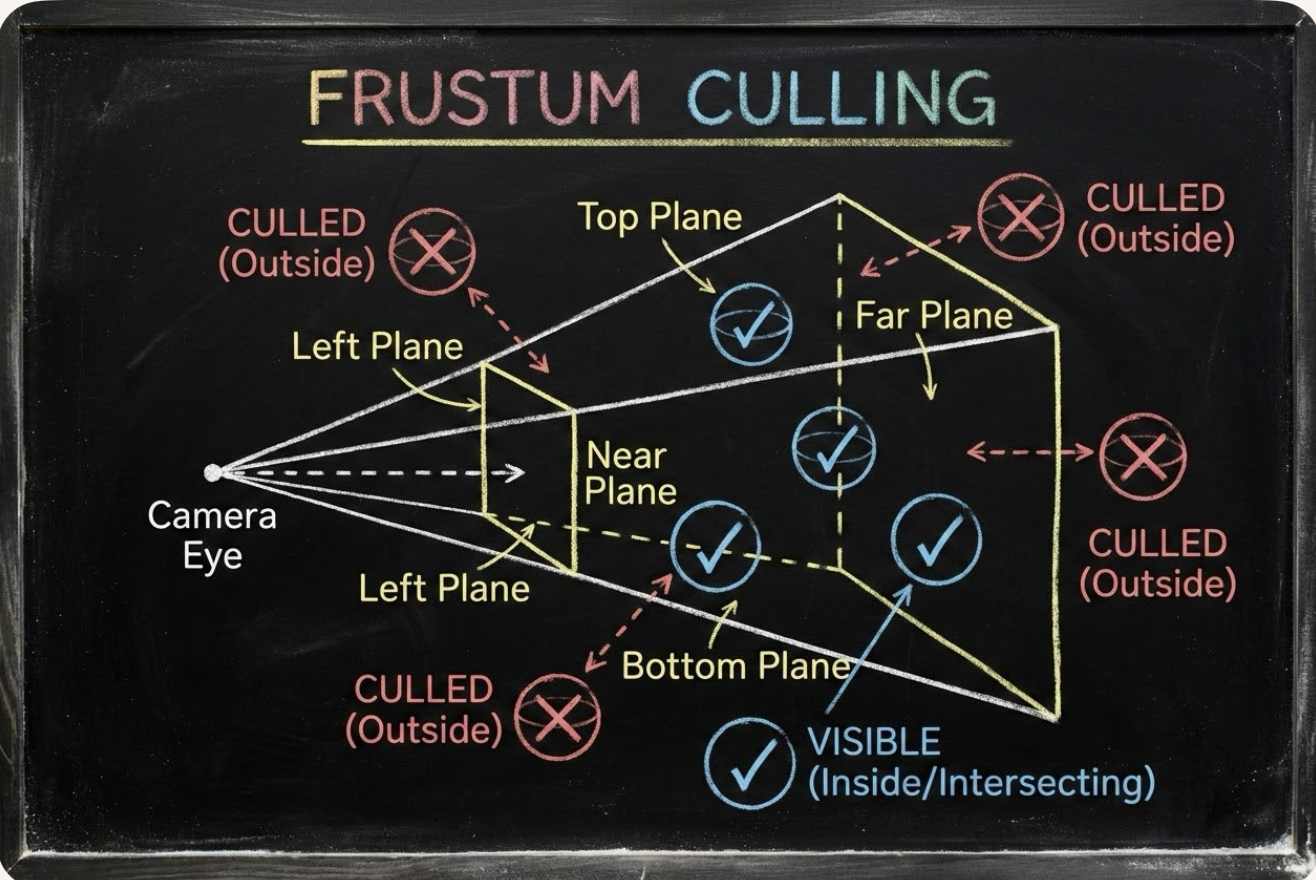
Fig. 35 The needed animation space
Animation Parameters
✅ CPU only updates small animation parameters named Uniform Updates as appeared in Fig. 33; GPU computes the heavy per‑vertex work.
The 3D animation will trigger the 3D rendering process for each 2D image drawing accoriding the Uniform Updates.
The “small animation parameters” updated by the CPU are formally called:
✔ Uniform updates
✔ Constant buffer updates
✔ Per‑frame / per‑draw constants
✔ Bone matrix palette updates (for skinning)
✔ Morph weight updates (for morphing)
These are the correct technical terms used in modern graphics pipelines.
⚓ The Proper Term: “Uniform Updates”
The most accurate and universal name is:
✅ Uniform updates
or
✅ Updating uniform buffers
Because the CPU is updating uniform data that the GPU reads during shading.
Examples of uniform data:
bone matrices
morph weights
animation time
material parameters
camera matrices
light parameters
These are small, constant‑for‑the‑draw values.
⚓ More Specific Terms Used in Game Engines
Animation Parameters
Used in animation systems:
“animation parameters”
“skinning parameters”
“bone palette”
“morph weights”
Per‑Frame Constants
Used in engine architecture:
“frame constants”
“per‑frame constant buffer”
“global shader constants”
Per‑Draw Constants
Used in render pipelines:
“per‑draw uniform block”
“per‑object constant buffer”
“material constant buffer”
⚓ In Modern APIs (GL, Vulkan, DirectX)
OpenGL
Uniforms
Uniform Buffer Objects (UBOs)
Shader Storage Buffer Objects (SSBOs)
DirectX
Constant Buffers (CBuffers)
Vulkan
Descriptor sets
Uniform buffers
All refer to the same concept: small CPU‑updated data that the GPU reads during shading.
3D Rendering Pipeline
The steps are shown in Fig. 36.
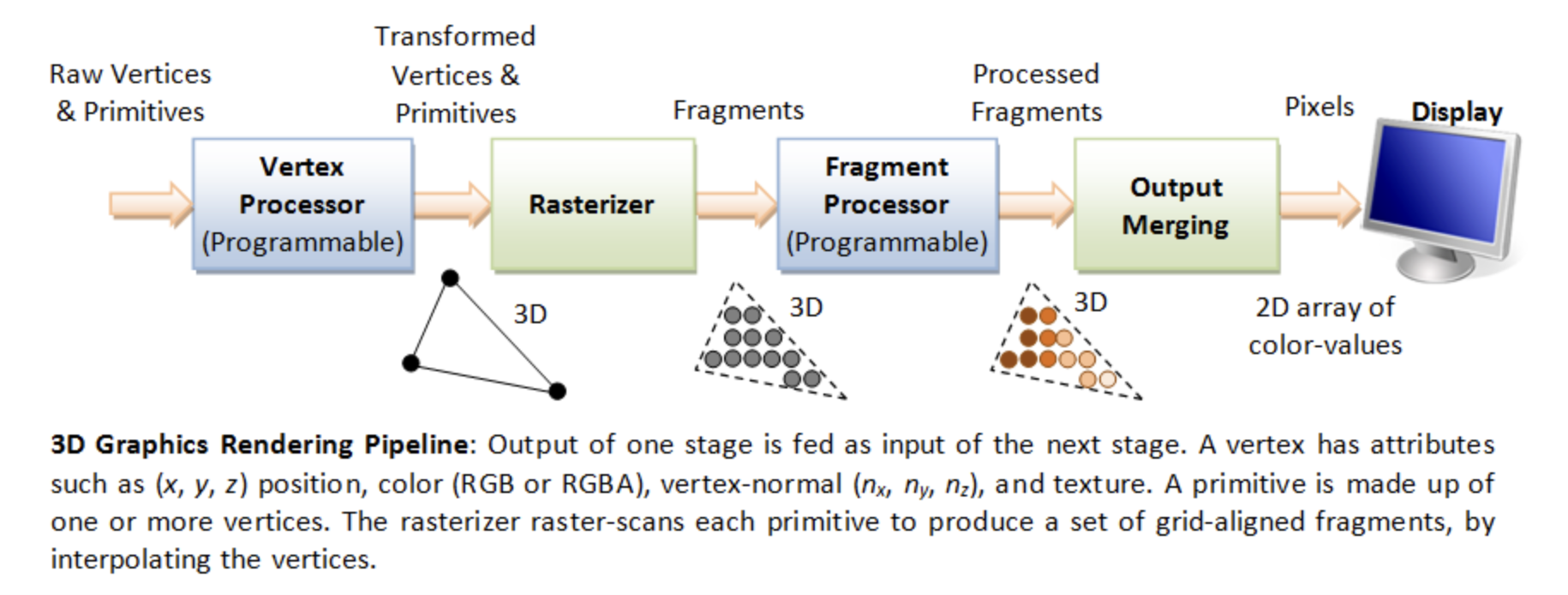
A fragment can be treated as a pixel in 3D spaces, which is aligned with the pixel grid, with attributes such as position, color, normal and texture.
From the previous Fig. 9 and Fig. 10 in section SW Stack and Data Flow, we introduce the 3D anmiation data are classified as follows:
Vertex Data = 3D model information (the mesh (geometry), such as VBO/VAO)
Animation Parameters = per‑frame uniform updates (transforms, bone matrices, camera, materials, …)
The complete steps of 3D Rendering pipeline, excluding animation are shown in the Fig. 37 from the OpenGL website [24] and in the Fig. 38. The website also provides a description for each stage. To clarify the modern GPU pipeline, Fig. 39 shows the use of Primitive Assembly (fixed-function) and Primitive Setup (fixed-function).
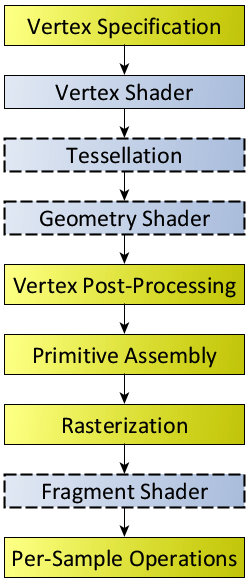
Fig. 37 Diagram of the Rendering Pipeline. The blue boxes are programmable shader stages. Shaders with dashed outlines indicate optional shader stages.¶ |
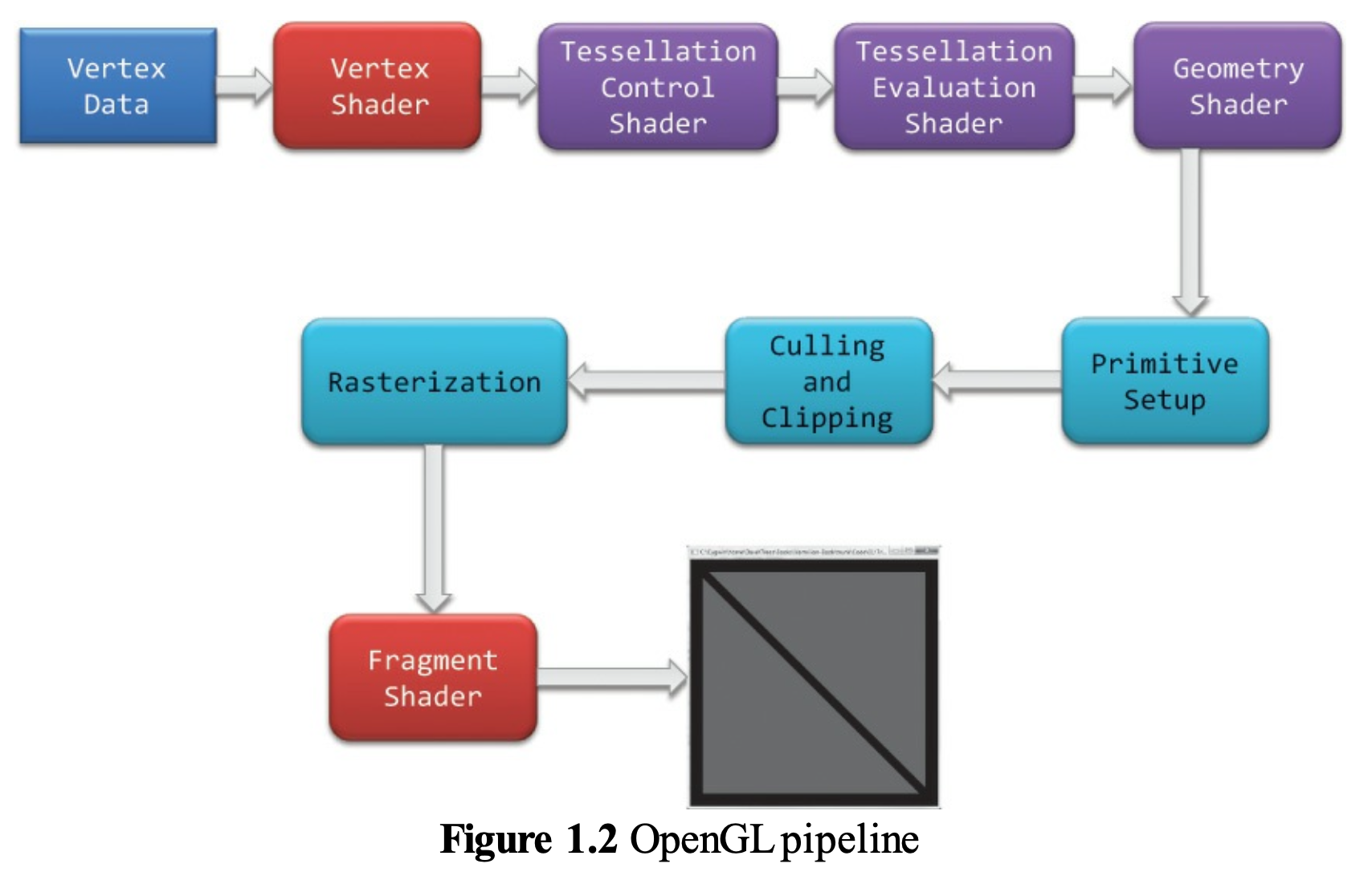
Fig. 38 OpenGL pipeline in blue book¶ |
In Fig. 37, the “Primitive Assembly” is the “Output Primitive Assembly”. A more accurate ordering is:
Vertex Shader
    ↓
Patch assembly / Input Primitive Assembly
    ↓
Tessellation
    ├── Tessellation Control Shader
    ├── Primitive Generation
    └── Tessellation Evaluation Shader
    ↓
Geometry Shader
    ↓
Output Primitive Assembly
    ↓
Rasterization
![digraph GPU_Pipeline {
rankdir=LR;
node [shape=box, style=rounded, fontsize=12];
VB [label="Vertex Buffer"];
VS [label="Vertex Shader", style=filled, fillcolor=orange];
subgraph cluster_ts {
label="Tessellation";
style=rounded;
PA [label="Patch Assembly\n(GL_PATCHES)"];
TCS [label="Tessellation\nControl Shader\n(optional)",
style=filled, fillcolor=orange];
TS [label="Tessellator\n(fixed-function)"];
TES [label="Tessellation\nEvaluation Shader\n(required when\n tessellation is enabled)",
style=filled, fillcolor=orange];
{ rank = same; PA; TCS; TS; TES }
}
subgraph cluster_pp {
label="Primitive Processing";
style=rounded;
IPA [label="Input Primitive Assembly\n(for Geometry Shader)"];
GS [label="Geometry Shader\n(optional)",
style=filled, fillcolor=orange];
OPA [label="Geometry Shader Output\nPrimitive Formation"];
Clip [label="Clipping"];
Cull [label="Face Culling"];
PS [label="Primitive Setup\n(rasterization prep)"];
{ rank = same; IPA; GS; OPA; Clip; Cull; PS }
}
RAST [label="Rasterizer"];
FS [label="Fragment Shader", style=filled, fillcolor=orange];
FB [label="Per-Fragment Operations\n& Framebuffer"];
VB -> VS;
// Tessellation path: VS outputs are grouped into patches first.
VS -> PA [label="GL_PATCHES"];
PA -> TCS [label="input patch"];
TCS -> TS;
PA -> TS [label="no TCS", style=dashed];
TS -> TES;
// The TES produces the tessellated primitive stream.
TES -> IPA [label="tessellated primitives"];
// Non-tessellation path.
VS -> IPA [label="no tessellation", style=dashed];
// A Geometry Shader receives already assembled input primitives.
IPA -> GS [label="assembled primitives"];
GS -> OPA;
IPA -> Clip [label="no Geometry Shader", style=dashed];
// GS output is interpreted according to its declared output topology.
OPA -> Clip;
Clip -> Cull;
Cull -> PS;
PS -> RAST;
RAST -> FS;
FS -> FB;
{ rank = same; VB; VS }
{ rank = same; RAST; FS; FB }
}](_images/graphviz-c82d817f6fcadd45c1506d24d68c543fef52d342.png)
Fig. 39 Modern GPU Pipeline
As shown in Fig. 39:
Vertex Shader and Tessellation: process and transform vertex data.
Primitive Processing: processes and transforms primitive data.
Rasterizer: Primitives → Fragments.
Fragment Shader: Fragments → Colored Fragments.
As illustrated in the Cross Product section,
✔️ Each mesh (triangle or primitive) has a fixed “outer” and “inner” side, determined by CCW ordering in object space.
✔️ By reading these CCW-ordered vertices in a triangle sequentially, the shape and surface orientation of the 3D model can be constructed.
✔️ There is no need to wait for the entire mesh to be received; once three CCW-ordered vertices in a triangle are available, each triangle can be processed correctly.
✔️ When the camera moves to the inside an object: CCW ↔ CW flips.
This means:
✔️ Vertex Shader and Tessellation: may process each vertex independently as long as the vertex order in a triangle is preserved.
✔️ Once three CCW-ordered vertices are available, Primitive Assembly can convert them into a triangle and pass it to the next pipeline stage.
After vertices are assembled into primitives (such as triangles), the front-facing and back-facing surfaces can be determined, and the hidden primitives can be removed.
The Red Book and Blue Book show only Vertex Specification and Vertex Data in the rendering flow because they never show Animation Parameters as part of the rendering flow. The animation flow from CPU to GPU is shown in Fig. 40, based on Fig. 36.
![digraph CPU_GPU_Pipeline {
rankdir=LR;
node [shape=box, style=rounded, fontsize=12];
subgraph cluster_cpu {
label="CPU";
style=rounded;
CPU_Vertex [label="Load 3D Model\n(Vertex Data)\nVBOs, VAOs, Indices"];
CPU_Anim [label="Update Animation Parameters\n(Bone Matrices, Morph Weights,\nTime, Material Parameters)"];
}
subgraph cluster_gpu {
label="GPU";
style=rounded;
VS [label="Vertex Shader\n(Skinning, Morphing,\nModel/View/Projection Transform)"];
Raster [label="Rasterizer\n(Primitive Assembly,\nClipping, Interpolation)"];
FS [label="Fragment Shader\n(Lighting, Texturing,\nShading, Materials)"];
FB [label="Final Rendered Image\n(Framebuffer Output)"];
}
CPU_Vertex -> VS;
CPU_Anim -> VS;
VS -> Raster;
Raster -> FS;
FS -> FB;
}](_images/graphviz-7b19f3e3a89016e74e997b1e6a961270370d70a5.png)
Fig. 40 CPU and GPU Pipeline For Shaders
Each draw call may correspond to:
one mesh
one submesh
one meshlet (in mesh‑shader pipelines)
or many meshes batched together
Although the Rendering Pipeline shown in Fig. 37 and Fig. 38 do not explicitly include per-frame animation flow— because the inputs are labeled Vertex Specification and Vertex Data and they do not show Animation Parameters as part of the rendering process—the pipeline is still applicable.
However the following table from OpenGL rendering pipeline Figure 1.2 and its stages from the book OpenGL Programming Guide, 9th Edition [1] is broad enough to cover animation.
Stage. |
Description |
|---|---|
Vertex Shading |
Vertex → Vertex and other data such as color for later passes. For each vertex issued by a drawing command, a vertex shader processes the data associated with that vertex. Vertex Shader: provides the Vertex → Vertex transformation effects controlled by the users. |
Tessellation Shading |
Create more detail on demand when zoomed in. After the vertex shader processes each vertex, the tessellation shader stage (if active) continues processing. The tessellation stage is actually divided into two shaders known as the tessellation control shader and the tessellation evaluation shader. A single patch from Tesslation Control Shader (TCS) and Tesslation Evaluation Shader (TVS) can generate millions of micro‑triangles. See reference below. |
Primitive Assembly |
This is a fixed‑function hardware stage: forms triangles/lines/points. |
Geometry Shader |
Primitive Transformation: output zero primitives (cull), output one primitive (pass‑through), output many primitives (amplify) and output different topology (e.g., point → quad) Allows additional processing of geometric primitives. This stage may create new primitives before rasterization. The Geometry shading stage is another optional stage that can modify entire geometric primitives within the OpenGL pipeline. This stage operates on individual geometric primitives allowing each to be modified. In this stage, you might generate more geometry from the input primitive, change the type of geometric primitive (e.g., converting triangles to lines), or discard the geometry altogether. |
Culling |
Remove entire primitives that are hidden or outside the viewport. |
Clipping |
Clip the hidden portions of the primitive, separating it into visible and hidden parts and discarding the hidden portions. |
Primitive Setup (rasterization preparation) |
This stage: takes the final primitive (after GS), computes edge equations, computes barycentric interpolation coefficients, determine rasterization rules and prepare for triangle traversal. |
Rasterization |
Geometric Primitives → Fragment. The job of the rasterizer is to determine which screen locations are covered by a particular piece of geometry (point, line, or triangle). Knowing those locations, along with the input vertex data, the rasterizer linearly interpolates the data values for each varying variable in the fragment shader and sends those values as inputs into your fragment shader. A fragment can be treated as a pixel in 3D spaces, which is aligned with the pixel grid, with attributes such as position, color, normal and texture. Early Depth and Stencil Tests (Early‑Z): reject hidden fragments before shading. |
Fragment Shading |
Fragment → Colored Fragment. Determine color for each pixel. In this stage, a fragment’s color and depth values are computed and then sent for further processing in the fragment-testing and blending parts of the pipeline. The final stage where you have programmable control over the color of a screen location is fragment shading. In this shader stage, you use a shader to determine the fragment’s final color (although the next stage, per-fragment operations, can modify the color one last time) and potentially its depth value. Fragment shaders are very powerful, as they often employ texture mapping to augment the colors provided by the vertex processing stages. A fragment shader may also terminate processing a fragment if it determines the fragment shouldn’t be drawn; this process is called fragment discard. A helpful way of thinking about the difference between shaders that deal with vertices and fragment shaders is this: vertex shading (including tessellation and geometry shading) determines where on the screen a primitive is, while fragment shading uses that information to determine what color that fragment will be. |
Stage. |
Description |
|---|---|
Per-Fragment Operations |
During this stage, a fragment’s visibility is determined using depth testing (also commonly known as z-buffering) and stencil testing. If a fragment successfully makes it through all of the enabled tests, it may be written directly to the framebuffer, updating the color (and possibly depth value) of its pixel, or if blending is enabled, the fragment’s color will be combined with the pixel’s current color to generate a new color that is written into the framebuffer. |
Compute shading stage |
Compute shader: may be applied in any stage. This is not part of the graphical pipeline like the stages above, but stands on its own as the only stage in a program. A compute shader processes generic work items, driven by an application-chosen range, rather than by graphical inputs like vertices and fragments. Compute shaders can process buffers created and consumed by other shader programs in your application. This includes framebuffer post-processing effects or really anything you want. Compute shaders are described in Chapter 12 of Red Book, “Compute Shaders” [25]. |
Tessellation
Tessellation Shading: The core problem that Tessellation deals with is the static nature of 3D models in terms of their detail and polygon count. The thing is that when we look at a complex model such as a human face up close we prefer to use a highly detailed model that will bring out the tiny details (e.g. skin bumps, etc). A highly detailed model automatically translates to more triangles and more compute power required for processing. … One possible way to solve this problem using the existing features of OpenGL is to generate the same model at multiple levels of detail (LOD). For example, highly detailed, average and low. We can then select the version to use based on the distance from the camera. This, however, will require more artist resources and often will not be flexible enough. … Let’s take a look at how Tessellation has been implemented in the graphics pipeline. The core components that are responsible for Tessellation are two new shader stages and in between them a fixed function stage that can be configured to some degree but does not run a shader. The first shader stage is called Tessellation Control Shader (TCS), the fixed function stage is called the Primitive Generator (PG), and the second shader stage is called Tessellation Evaluation Shader (TES). Some GPUs do not implement this fixed-function stage in hardware and do not provide TCS, TES, or geometry shaders. A user can write compute shaders instead to generate detail on the fly. This surface is usually defined by some polynomial formula and the idea is that moving a CP has an effect on the entire surface. … The group of CPs is usually called a Patch [26]. The data flow in the Tessellation Stage between the TCS, Fixed-Function Tessellator, and TES is illustrated in Fig. 41. Chapter 9 of Red Book [1] has details. The next section Tessellation Example describes the details for the tessellation with an example.
Tessellation cannot decrease the resolution of vertices from the VS. The Geometry Shader can reduce geometry (by discarding primitives), but it cannot reduce the number of input vertices coming from VS/TES. The rasterizer can reduce fragments, but it cannot reduce vertices.
Data Flow
The following diagrams summarize the OpenGL rendering pipeline: Fig. 41 and Fig. 42.
![digraph OpenGL_Pipeline_Part1 {
rankdir=LR;
node [shape=box, style=rounded, fontsize=12];
App [label="Application"];
VS [label="Vertex Shader"];
subgraph cluster_optional {
label="Optional Stages";
style="rounded,dashed";
color="gray";
subgraph cluster_ts {
label="Tessellation";
style=rounded;
TCS [label="Tessellation Control Shader\n(TCS)"];
TS [label="Fixed-Function Tessellator"];
TES [label="Tessellation Evaluation Shader\n(TES)"];
TCS -> TS [label="Control Points +\nTessellation Levels"];
TS -> TES [label="Tessellated domain\ncoordinates"];
{ rank = same; TCS; TS; TES }
}
GS [label="Geometry Shader"];
}
PA [label="Primitive Assembly"];
PS [label="Primitive Setup"];
App -> VS [label="Vertex Arrays"];
VS -> TCS [label="Transformed Vertices +\nControl Points (CPs)"];
TES -> PA [label="Tessellated Vertices\n(Increased Vertex Count)"];
PA -> GS;
GS -> PS [label="Modified Primitives"];
//{ rank = same; TCS; TES }
}](_images/graphviz-813909b126bf57f8e788a20ede94387584df59df.png)
Fig. 41 The part 1 of GPU Rendering Pipeline Stages
![digraph OpenGL_Pipeline_Part2 {
rankdir=LR;
node [shape=box, style=rounded, fontsize=12];
PS [label="Primitive Setup"];
Raster [label="Rasterization"];
FS [label="Fragment Shader"];
PF [label="Per-Fragment Ops"];
FB [label="Framebuffer"];
PS -> Raster [label="Assembled Primitives"];
Raster -> FS [label="Fragments"];
FS -> PF [label="Colored Fragments"];
PF -> FB [label="Final Fragments"];
}](_images/graphviz-3c813ddb9e432947f1991ce338444f3762e3efcc.png)
Fig. 42 The part 2 of GPU Rendering Pipeline Stages
The data flow through the OpenGL shader pipeline and the details of the TCS, Fixed-Function Tessellator, and TES are described below.
Shader Stage |
Input Data (from CPU or previous stage) |
Output Data (to next stage) |
How GPU Hardware Uses These Data (with Stage Name) |
|---|---|---|---|
Vertex Shader |
|
|
|
Tessellation Control Shader (TCS) |
|
|
|
Fixed‑Function Tessellator (TS) |
|
|
|
Tessellation Evaluation Shader (TES) |
|
|
|
Geometry Shader |
|
|
|
Shader Stage |
Input Data (from CPU or previous stage) |
Output Data (to next stage) |
How GPU Hardware Uses These Data (with Stage Name) |
|---|---|---|---|
Rasterizer (Fixed Function) |
|
|
|
Fragment Shader |
|
|
|
Output Merger / ROP (Fixed Function) |
|
|
|
Varying
A varying is a piece of data that:
Comes out of the vertex shader
Gets interpolated by the rasterizer
Arrives as input to the fragment shader
It is called varying because its value varies across the surface of a triangle.
Varying Name |
Meaning |
Why It Varies Across the Primitive |
|---|---|---|
vNormal |
Surface normal at each vertex |
Lighting requires a smoothly changing normal across the triangle so per-pixel shading can compute correct diffuse and specular terms |
vUV |
Texture coordinates |
Each pixel needs its own UV to sample the correct texel from the texture |
vColor |
Vertex color (per-vertex material tint) |
Enables smooth color gradients or per-vertex painting effects |
vWorldPos |
World-space position of the vertex |
Used for per-pixel lighting, reflections, shadows, and screen-space effects; must be interpolated so each fragment knows its own world position |
In 2D animation, a model is a single flat view and can be viewed only from that side. To display different views, multiple 2D models must be created and switched from frame to frame [27].
Mesh Construction
As described in section 3D Rendering Pipeline:
✔️ By reading these CCW-ordered vertices in a triangle sequentially, the shape and surface orientation of the 3D model can be constructed.
Because a mesh contains many vertices shared across triangles, this section explains how OpenGL and GPUs avoid reprocessing those redundant vertices.”
OpenGL Triangles
OpenGL has:
GL_TRIANGLES — every 3 vertices form an independent triangle
GL_TRIANGLE_STRIP — consecutive vertices share edges
GL_TRIANGLE_FAN — all triangles share the first vertex
For example:
glDrawArrays(GL_TRIANGLE_STRIP, 0, 6);

With vertices:

v0 ───── v2 ───── v4
│     ╱  │     ╱  │
│   ╱    │   ╱    │
│ ╱      │ ╱      │
v1 ───── v3 ───── v5

vertices:
v0, v1, v2, v3, v4, v5

Triangle list for GL_TRIANGLE:

indices:

(0,1,2)
(2,1,3)
(2,3,4)
(4,3,5)

Triangle strip for GL_TRIANGLE_STRIP:

indices:

0,1,2,3,4,5
The triangles are generated as:
Triangle 0: v0, v1, v2
Triangle 1: v2, v1, v3
Triangle 2: v2, v3, v4
Triangle 3: v4, v3, v5
So after the first 3 vertices, each additional vertex creates one new triangle.
For a GPU compiler, triangle strip is important because the primitive assembly stage has to keep track of the previous vertices and alternates triangle winding order for successive triangles.
For the first triangle:
v0 → v1 → v2
For the second triangle, the shared edge is v1-v2. To maintain the same winding direction, OpenGL uses:
v2 → v1 → v3
rather than:
v1 → v2 → v3
That causes the second triangle’s winding to be opposite.
3D models may create meshes with ndividual triangles or triangle strips. However, real 3D meshes are usually not one continuous strip. A model has:
branches
holes
disconnected surfaces
different materials
hard edges
UV seams
normal seams
These make a single efficient triangle strip difficult. Modern GPUs also have post-transform vertex caches, so well-organized triangle lists can reuse vertex shader results efficiently.
The mesh itself is a collection of triangles. GL_TRIANGLES and GL_TRIANGLE_STRIP are primarily different primitive assembly methods for interpreting the index/vertex stream. Also, modern APIs such as Vulkan and Direct3D still support triangle strips, but triangle lists are the dominant representation for general-purpose 3D meshes.
Post-Transform Vertex Cache
A modern GPU usually has a small post-transform vertex cache that stores the results of vertex shader execution.
This cache allows the GPU to avoid executing the vertex shader multiple times for the same vertex when that vertex is referenced by several triangles.
For example, consider the following indexed triangle list:
Triangle 0: 0, 1, 2
Triangle 1: 2, 1, 3
Triangle 2: 2, 3, 4
The vertices 1 and 2 are shared by the first two triangles. The GPU
can process the first triangle as follows:
Index       Cache       Action
------------------------------------
  0         miss        Run vertex shader
  1         miss        Run vertex shader
  2         miss        Run vertex shader
When processing the second triangle:
Index       Cache       Action
------------------------------------
  2         hit         Reuse vertex shader result
  1         hit         Reuse vertex shader result
  3         miss        Run vertex shader
Therefore, although vertex 1 and vertex 2 appear multiple times in the
index buffer, their vertex shaders do not need to be executed again as long as
their transformed results are still in the cache.
The cache is called a post-transform cache because it stores the results after vertex transformation, rather than merely caching the original vertex attributes.
A simplified GPU pipeline is:
Index Buffer
     |
     v
Vertex Fetch
     |
     v
Vertex Shader
     |
     v
Post-Transform Vertex Cache
     |
     v
Primitive Assembly
     |
     v
Rasterization
Triangle Order Matters
The cache has limited capacity. If a vertex is referenced again after it has been evicted from the cache, the vertex shader must execute again.
For example, consider a small cache:
T0: 0, 1, 2
T1: 3, 4, 5
T2: 0, 1, 2
After processing T0, vertices 0, 1, and 2 may be in the
cache. Processing T1 replaces them with 3, 4, and 5. When
T2 is processed, vertices 0, 1, and 2 are no longer in the
cache, so their vertex shaders must execute again.
A different triangle order can keep shared vertices in the cache for longer:
T0: 0, 1, 2
T1: 2, 1, 3
T2: 2, 3, 4
T3: 3, 4, 5
This ordering has good locality because neighboring triangles share recently processed vertices.
Mesh Optimization
A mesh optimizer can reorder the triangles, and therefore the indices, to improve vertex-cache locality.
The mesh optimizer does not remove duplicated vertex processing by itself. Instead, it arranges the triangle order so that the GPU’s post-transform vertex cache can reuse more previously computed vertex shader results.
The relationship is:
Mesh Optimizer
      |
      | Reorders triangles / indices
      v
Better Vertex Locality
      |
      v
Post-Transform Vertex Cache
      |
      | More cache hits
      v
Fewer Vertex Shader Executions
This is one reason that a well-organized triangle list can achieve substantial vertex reuse on modern GPUs, even without using a triangle strip.
Triangle strips provide vertex reuse through their primitive-assembly rules, whereas an optimized triangle list relies on the post-transform cache to reuse previously computed vertex shader results.
The two mechanisms are therefore different:
Triangle Strip
    |
    +-- Implicit vertex reuse in primitive assembly

Optimized Triangle List
    |
    +-- Explicit indices
    |
    +-- Good triangle ordering
    |
    +-- Post-transform cache reuse
Tessellation Example
In Chapter 9 (Tessellation), the Red Book [1] focuses on:
gl_TessLevelOuter[]
gl_TessLevelInner[]
It never mentioned to gnerate modified CPs in TCS. The following example give the output for (TCS → TS → TES) in patching a single rectangle.
An example for Inflated 4×4 Bézier Patch (TCS → TS → TES)
The following diagram illustrates the complete OpenGL tessellation pipeline for a 4×4 bicubic Bézier patch on 1 single rectangle. Only the four interior control points (5, 6, 9, 10) are lifted off the plane, producing a smooth inflated surface.
Tessellation Control Shader (TCS): output:
modified Control Points (CPs, Patch): gl_out
Tessellation level: gl_TessLevelInner, gl_TessLevelOuter
Another name for CPs is Patch.
The TCS outputs 16 CPs arranged in a 4×4 grid. Only CPs 5, 6, 9, and 10 are elevated to create curvature.
#version 450 core
layout(vertices = 16) out;

void main()
{
    // Copy all CPs
    gl_out[gl_InvocationID].gl_Position =
        gl_in[gl_InvocationID].gl_Position;

    // Inflate interior CPs
    if (gl_InvocationID == 5 ||
        gl_InvocationID == 6 ||
        gl_InvocationID == 9 ||
        gl_InvocationID == 10)
    {
        gl_out[gl_InvocationID].gl_Position +=
            vec4(0.0, 0.0, 1.0, 0.0);
    }

    // Tessellation levels
    if (gl_InvocationID == 0) {
        gl_TessLevelOuter[0] = 4.0;
        gl_TessLevelOuter[1] = 4.0;
        gl_TessLevelOuter[2] = 4.0;
        gl_TessLevelOuter[3] = 4.0;

        gl_TessLevelInner[0] = 4.0;
        gl_TessLevelInner[1] = 4.0;
    }
}
Fixed-Function Tessellator (TS), also known as the Primitive Generator (PG): output:
Tessellated coordinates (u,v,w): gl_TessCoord
The PG uses the tessellation levels to generate a set of points inside the triangle. Each point has its own barycentric coordinates. This set is called the tessellated coordinates.
The grid size depends on tessellation levels:
If gl_TessLevelOuter[0..3] = 4.0 and gl_TessLevelInner[0..1] = 4.0 → you get a 5×5 grid, Tessellated coordinates (u,v,w)
If you set 8.0 → you get a 9×9 grid
If you set 2.0 → you get a 3×3 grid
The fixed‑function tessellator generates a 5×5 evaluation grid for tessellation level 4.0. No shading language code is written for this stage.
Tessellation Evaluation Shader (TES): output:
Tessellated Vertices: gl_Position
For each (u, v), the TES computes the surface point P(u, v) as:
where the Bernstein basis functions are:
The TES evaluates the Bézier surface at each tessellated (u, v) coordinate using the 16 CPs.
#version 450 core
layout(quads, equal_spacing, cw) in;

float B(int i, float t) {
    if (i == 0) return (1 - t) * (1 - t) * (1 - t);
    if (i == 1) return 3 * t * (1 - t) * (1 - t);
    if (i == 2) return 3 * t * t * (1 - t);
    return t * t * t;
}

void main()
{
    float u = gl_TessCoord.x;
    float v = gl_TessCoord.y;

    vec4 p = vec4(0.0);
    int idx = 0;

    for (int i = 0; i < 4; ++i) {
        float bu = B(i, u);
        for (int j = 0; j < 4; ++j) {
            float bv = B(j, v);
            p += gl_in[idx].gl_Position * (bu * bv);
            idx++;
        }
    }

    gl_Position = p;
}
Result
The output for (TCS → TS → TES) in patching a single rectangle as the following table.
Inflated Bézier Patch: Control Points and Evaluated Surface (vec4)
All control points use homogeneous coordinates (x, y, z, w = 1.0). Evaluated surface points P(u,v) are also vec4.
CP Index |
Grid Position (i, j) |
Control Point (x, y, z, w) |
Evaluated P(u,v) = vec4 |
|---|---|---|---|
0 |
(0, 0) |
(0, 0, 0, 1) |
(0.0, 0.0, 0.0, 1) |
1 |
(1, 0) |
(1, 0, 0, 1) |
(1.0, 0.0, 0.0, 1) |
2 |
(2, 0) |
(2, 0, 0, 1) |
(2.0, 0.0, 0.0, 1) |
3 |
(3, 0) |
(3, 0, 0, 1) |
(3.0, 0.0, 0.0, 1) |
4 |
(0, 1) |
(0, 1, 0, 1) |
(0.0, 1.0, 0.0, 1) |
5 |
(1, 1) |
(1, 1, 1, 1) |
(1.0, 1.0, 0.5625, 1) |
6 |
(2, 1) |
(2, 1, 1, 1) |
(2.0, 1.0, 0.5625, 1) |
7 |
(3, 1) |
(3, 1, 0, 1) |
(3.0, 1.0, 0.0, 1) |
8 |
(0, 2) |
(0, 2, 0, 1) |
(0.0, 2.0, 0.0, 1) |
9 |
(1, 2) |
(1, 2, 1, 1) |
(1.0, 2.0, 0.5625, 1) |
10 |
(2, 2) |
(2, 2, 1, 1) |
(2.0, 2.0, 0.5625, 1) |
11 |
(3, 2) |
(3, 2, 0, 1) |
(3.0, 2.0, 0.0, 1) |
12 |
(0, 3) |
(0, 3, 0, 1) |
(0.0, 3.0, 0.0, 1) |
13 |
(1, 3) |
(1, 3, 0, 1) |
(1.0, 3.0, 0.0, 1) |
14 |
(2, 3) |
(2, 3, 0, 1) |
(2.0, 3.0, 0.0, 1) |
15 |
(3, 3) |
(3, 3, 0, 1) |
(3.0, 3.0, 0.0, 1) |
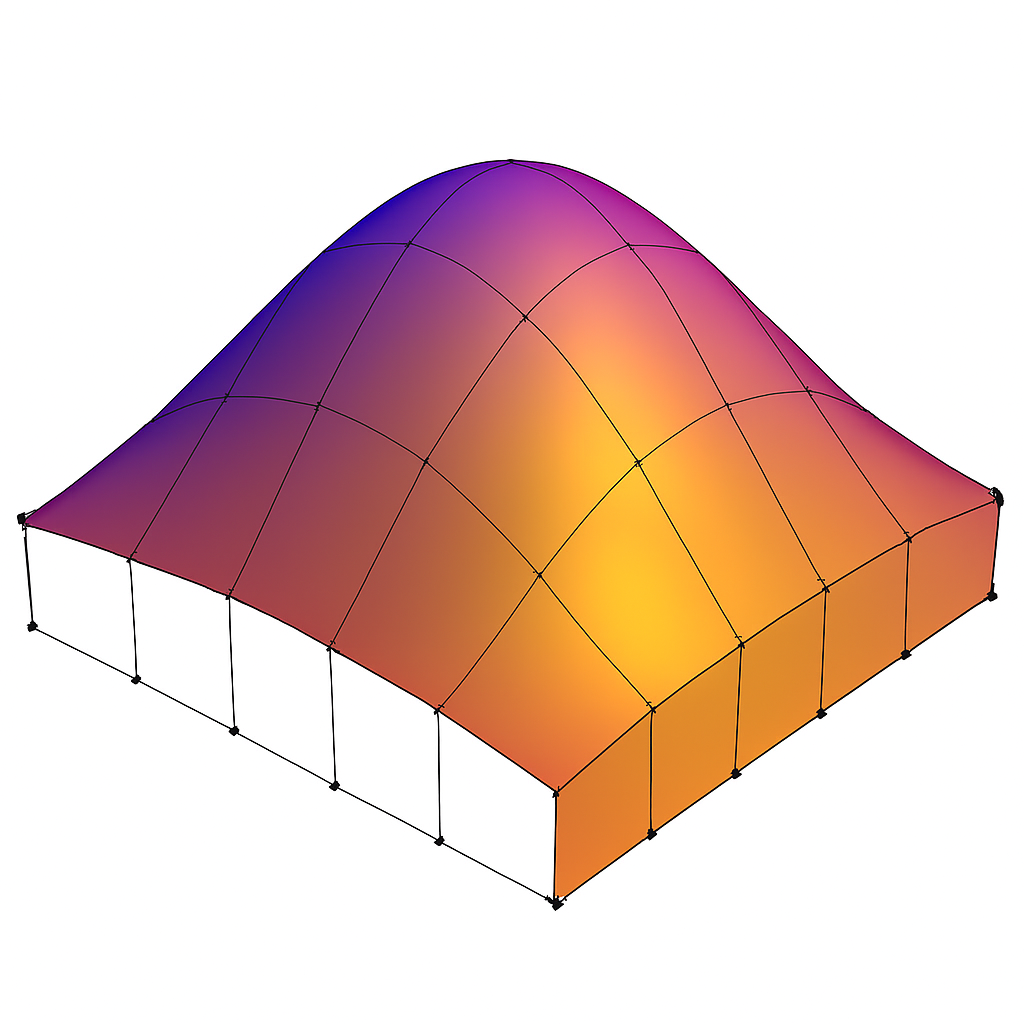
Fig. 43 The final rendering result for 5×5 tessellated mesh.¶ |
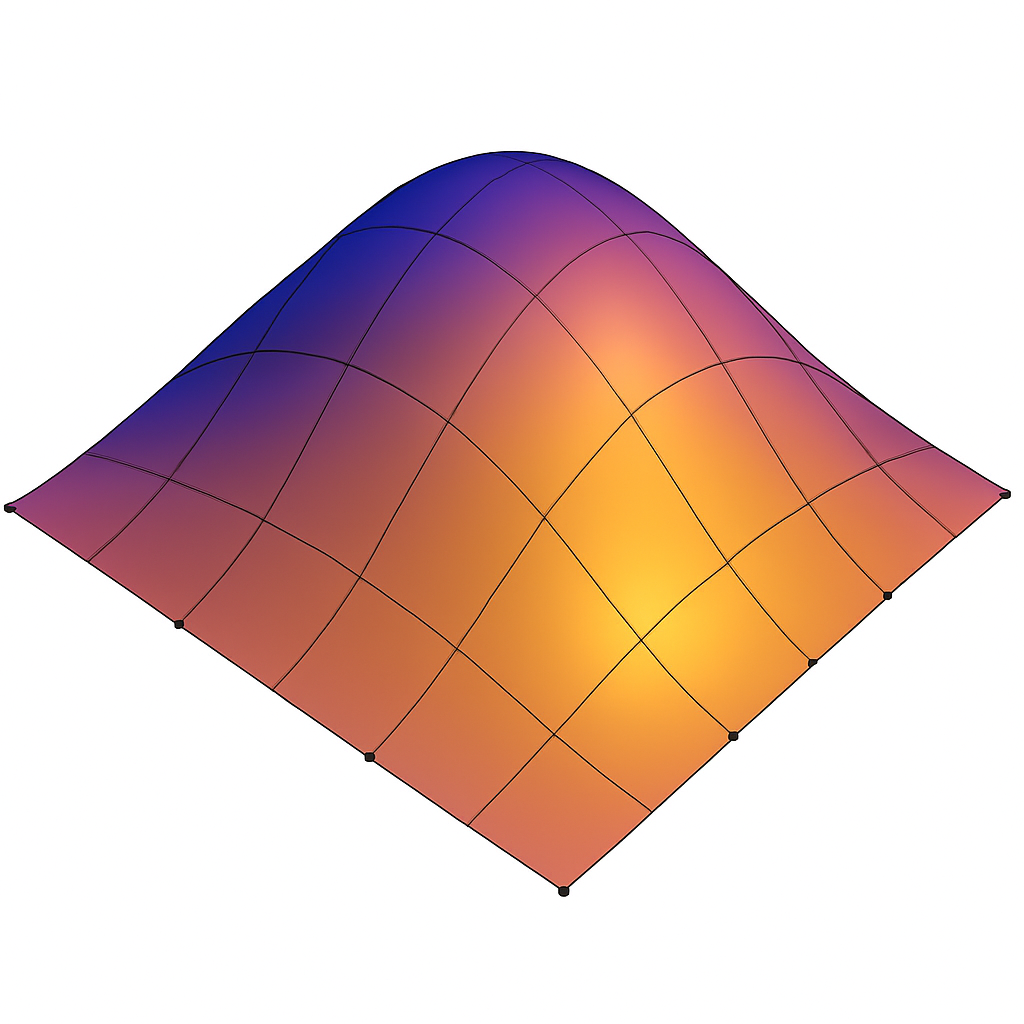
Fig. 44 Geometry Shader (GS) can expand a 5×5 tessellated grid into a 6×6 mesh¶ |
The following TCS GLSL code from the Red Book adjusts the resolution of control points at runtime according to the distance of the square’s vertices.
Specifying Tessellation Level Factors Using Perimeter Edge Centers.
#version 450 core

// Each patch has four precomputed edge centers:
//   edgeCenter[0] = left edge center
//   edgeCenter[1] = bottom edge center
//   edgeCenter[2] = right edge center
//   edgeCenter[3] = top edge center
struct EdgeCenters {
    vec4 edgeCenter[4];
};

// Array of edge-center data, one entry per patch
uniform EdgeCenters patch[];

// Camera position in world space
uniform vec3 EyePosition;

layout(vertices = 16) out;

void main()
{
    // Pass through control points unchanged
    gl_out[gl_InvocationID].gl_Position =
        gl_in[gl_InvocationID].gl_Position;

    // Synchronize all invocations
    barrier();

    // Only invocation 0 computes tessellation levels
    if (gl_InvocationID == 0)
    {
        // Loop over the four perimeter edges
        for (int i = 0; i < 4; ++i)
        {
            // Distance from eye to this edge center
            float d = distance(
                patch[gl_PrimitiveID].edgeCenter[i],
                vec4(EyePosition, 1.0)
            );

            // Scale factor controlling how quickly tessellation increases
            const float lodScale = 2.5;

            // Convert distance to tessellation level
            float tessLOD = mix(
                0.0,
                gl_MaxTessGenLevel,
                d * lodScale
            );

            gl_TessLevelOuter[i] = tessLOD;
        }
    #if 1
        // Compute the inner tessellation as the average of opposing outer
        // edges: differently from Red Book.
        // It’s what most engines (Unreal, Unity HDRP, Vulkan samples) do.
        // Inner tessellation is the average of outer levels
        float inner = 0.5 *
            (gl_TessLevelOuter[0] + gl_TessLevelOuter[2]);

        inner = clamp(inner, 0.0, gl_MaxTessGenLevel);
        gl_TessLevelInner[0] = inner;
        gl_TessLevelInner[1] = inner;
    #else
        // The Red Book computes outer tessellation levels first, then
        // derives the inner levels from the last computed tessLOD.
        tessLOD = clamp(0.5 * tessLOD, 0.0, gl_MaxTessGenLevel);
        gl_TessLevelInner[0] = tessLOD;
        gl_TessLevelInner[1] = tessLOD;
    #endif
    }
}
The texture function with the argument DisplacementMap in the Red Book, as shown in the following code, does not return color data as in the Fragment Shader. It returns the vertex position data for displacement, such as a roughness map or anything related to surface appearance.
p += texture(DisplacementMap, gl_TessCoord.xy);
Mobile GPU 3D Rendering
The traditional desktop GPUs is IMR — Immediate‑Mode Rendering: Cache misses dominate bandwidth.
TBDR — Tile‑Based Deferred Rendering: Cache misses are nearly eliminated.
Note
Idea:
1. TBDR divides the whole frame into small tiles that fit entirely into on‑chip SRAM.
2. Remove stages of Tessellation Control Shader (TCS), Tessellation Evaluation Shader (TES) and Geometry Shader (GS) since they are optional stages are shown in Fig. 38. Instead, developers use compute shaders before the graphics pipeline to generate meshlets, perform LOD selection, or add extra geometric detail for close‑up room-in effects is shown as Fig. 47.
★ TBDR reduces cache‑miss rate by roughly 10×–50× compared to IMR, because all intermediate color/depth/stencil traffic stays in on‑chip tile memory instead of going to L2/DRAM.
★ Desktop GPUs adopt IMR partly because GS/Tess/Mesh Shaders cannot run efficiently on TBDR. In addition, desktop GPUs adopt IMR because they have the power, bandwidth, and architectural freedom to support unpredictable geometry pipelines and massive workloads that would break TBDR’s tile‑based constraints.
TBDR — Tile‑Based Deferred Rendering
⚠️ For low power mobile device, mobile GPUs use tile-based rendering to reduce the traffice to DRAM as described below:
The traditional desktop GPUs is IMR — Immediate‑Mode Rendering:
IMR: “Draw call arrives → render immediately”
CPU issues DrawCall #1
→ GPU transforms vertices
→ GPU rasterizes fragments
→ GPU writes to DRAM
It never waits to see the rest of the frame.
2. TBDR: “Draw call arrives → store geometry, don’t render yet”. TBDR processes it into two phases as follows:
Phase 1 — Binning (Full‑Frame Geometry Processing) is shown as Fig. 45.
![digraph TBDR_Binning_Flow {
rankdir=LR;
node [shape=box, style=rounded];
CPU_DrawCall [label="CPU Issues Draw Call"];
VS [label="Vertex Shader\n(Transform Vertices)"];
TriangleSetup [label="Triangle Setup\n(Bounding Box, Coverage)"];
Binner [label="Tile Binner\n(Determines Which Tiles Each Triangle Touches)"];
TileLists [label="Per-Tile Triangle Lists\n(Store Geometry; No Rendering Yet)"];
CPU_DrawCall -> VS -> TriangleSetup -> Binner -> TileLists;
}](_images/graphviz-fbda71c498e8e3aa51c5a92dd0780ab7c9ebc737.png)
Fig. 45 TBDR Pipeline
When a draw call arrives on a TBDR GPU:
→ It runs the vertex shader
→ It transforms all triangles
→ It determines which tiles each triangle touches
→ It stores triangle references in per‑tile lists is shown as follows:
Example of per‑tile lists
Tile 0 → triangles: [T1, T7, T8, T20]
Tile 1 → triangles: [T2, T3, T7]
Tile 2 → triangles: [T4, T5, T6, T9, T10]
...
Phase 2 — Tile Rendering (Deferred Shading)
For each tile:
→ Load tile’s triangle list
→ Rasterize only those triangles
→ Shade only visible fragments
→ Keep all intermediate buffers in on‑chip SRAM
→ Write final tile to DRAM once
★ A tile is a small portion of the rendered frame. In Phase 2—tile rendering— the GPU renders each tile and keeps its intermediate result in SRAM.
TBDR Rendering
✅ Rendering flow:
Vertax Shader → Primitive Setup → Tile-Based Culling and Clipping → Rasterization → Fragment Shader
TBDR architectures depend on:
predictable geometry counts,
small on-chip tile memory,
minimal external memory traffic.
⚠️ As described in section 3D Rendering Pipeline, Geometry Shader (GS) can generate both more vertices and more primitives than it receives. A single patch from Tesslation Control Shader (TCS) and Tesslation Evaluation Shader (TVS) can generate millions of micro‑triangles. GS and Tessellation introduce unbounded geometry amplification, which breaks these assumptions and forces expensive DRAM spills for TBDR as shown in Fig. 46,
![digraph TBDR_GS_Comparison {
rankdir=LR;
node [shape=box, style=rounded, fontsize=11];
// Clean TBDR pipeline
subgraph cluster_clean {
label="A. Conventional TBDR Pipeline (Mobile GPUs: Mali / PowerVR / Apple)";
style=rounded;
C_VS [label="Vertex Shader\n• Transform\n• Skinning\n• Varyings"];
C_PA [label="Primitive Assembly\n• Triangle setup\n• Culling\n• Clipping"];
C_Tile [label="Tiling / Binning\n• Bin triangles\n• Build tile lists\n• Predictable geometry"];
C_Rast [label="Rasterization\n• Triangle traversal\n• Pixel coverage\n• Early-Z"];
C_FS [label="Fragment Shader\n• Shading\n• Texturing\n• Lighting"];
C_WB [label="Tile Writeback\n• Store tile once\n• Low bandwidth"];
C_VS -> C_PA -> C_Tile -> C_Rast -> C_FS -> C_WB;
}
// GS/Tessellation amplified pipeline
subgraph cluster_gs {
label="B. TBDR with Geometry Shaders/Tessellation (Hypothetical — Why It Breaks)";
style=rounded;
G_VS [label="Vertex Shader"];
G_Tess [label="Tessellation / Geometry Shader\n• 1→64→256 triangles\n• Unbounded amplification\n• View-dependent"];
G_PA [label="Primitive Assembly\n(post-amplification)"];
G_Tile [label="Tiling / Binning\n• Tile list overflow\n• Unpredictable size\n• May spill to DRAM"];
G_Rast [label="Rasterization\n• Heavy load due to amplified geometry"];
G_FS [label="Fragment Shader"];
G_WB [label="Tile Writeback\n• Multiple passes\n• High bandwidth"];
G_VS -> G_Tess -> G_PA -> G_Tile -> G_Rast -> G_FS -> G_WB;
}
// Annotation arrows
G_Tess -> G_Tile [label="massive geometry\namplification", color="red"];
G_Tile -> G_WB [label="DRAM spills\n(high power)", color="red"];
}](_images/graphviz-c606690443b44fedefd47994f94c0fb447b3755d.png)
Fig. 46 CPU and GPU Pipeline For Shaders in Mobile Device
This is why Mali, PowerVR, Apple, and Adreno mobile GPUs all omit these stages [28] [29].
Developers manually invoke compute shaders to generate meshlets or additional geometry, adding extra geometric detail for close-up zoom-in effects. Both Mali and PowerVR GPUs then run the standard vertex shader on the generated results.
✔ Step 1 — Developer dispatches a compute shader
This compute shader can do things like:
break a big mesh into meshlets as Fig. 47. The mesh and meshlets are described in the Mesh-Shader Pipeline next section.
generate more vertices for detail (subdivision, displacement)
perform LOD selection
cull invisible meshlets
generate new index/vertex buffers
This is developer‑controlled, not automatic.
![digraph Meshlet_Convert_To_Render_Mobile {
rankdir=LR;
node [shape=box, style=rounded, fontsize=12];
subgraph cluster_input {
label="Input Mesh Data";
style=rounded;
BigMesh [label="Source Mesh\n(Vertex and Index Buffers)"];
}
subgraph cluster_runtime {
label="Runtime / GPU Conversion";
style=rounded;
CS_Convert [label="Compute Shader\n(Convert Mesh → Meshlets,\nCluster Vertices & Triangles,\nCulling, LOD,\nBuild Meshlet Tables)",
style=filled, fillcolor=orange];
Meshlets [label="Generated Meshlets\n(Runtime GPU Data)"];
}
subgraph cluster_render {
label="Mobile Meshlet Rendering Flow\n(Compute + VS Pipeline)";
style=rounded;
VS [label="Mobile Rendering Pipeline\n(Vertex-Shader Pipeline)"];
}
BigMesh -> CS_Convert;
CS_Convert -> Meshlets;
Meshlets -> VS;
}](_images/graphviz-6554e77b1d027153724eda629ee8d0386f090a9e.png)
Fig. 47 CPU and GPU Pipeline For Shader`s in Mobile Device
The compute shader writes results into:
SSBOs
vertex buffers
index buffers
These buffers now contain the final geometry you want to render.
✔ Step 2 — Developer issues a normal draw call
The Mali and PowerVR’s rendering flow is illustrated as Fig. 48.
![digraph Mobile_GPU_Comparison {
rankdir=TB;
node [shape=box, style=rounded, fontsize=11];
// ARM Mali cluster
subgraph cluster_mali {
label="ARM Mali TBDR Pipeline";
style=rounded;
Mali_VS [label="Vertex Shader (VS)\n• Vertex fetch\n• Skinning / morphing\n• Model→World→Clip transforms\n• Varying generation", style="filled,rounded,bold", fillcolor="orange"];
Mali_PA [label="Primitive Assembly\n• Triangle assembly\n• Back-face culling\n• Clipping\n• Viewport transform", style="filled,rounded,bold", fillcolor="lightyellow"];
Mali_Tiling [label="Tiling / Binning\n• Bin triangles into tiles\n• Per-tile visibility\n• Tile list construction"];
Mali_Raster [label="Rasterization\n• Triangle traversal\n• Pixel coverage\n• Early-Z"];
Mali_FS [label="Fragment Shader (FS)\n• Shading\n• Texturing\n• Lighting\n• Blending", style="filled,rounded,bold", fillcolor="orange"];
Mali_Writeback [label="Tile Writeback\n• Store tile to framebuffer\n• Resolve MSAA"];
Mali_VS -> Mali_PA -> Mali_Tiling -> Mali_Raster -> Mali_FS -> Mali_Writeback;
}
// PowerVR cluster
subgraph cluster_powervr {
label="Imagination PowerVR TBDR Pipeline";
style=rounded;
PV_VS [label="Vertex Shader (VS)\n• Vertex fetch\n• Skinning / morphing\n• Transform to clip space\n• Varying generation", style="filled,rounded,bold", fillcolor="orange"];
PV_PB [label="Parameter Buffer (PB)\n• Store transformed vertices\n• Geometry parameter encoding\n• Prepare for tiling", style="filled,rounded,bold", fillcolor="lightyellow"];
PV_Tiling [label="Tiling / Binning\n• Tile list creation\n• Hidden surface removal (HSR)\n• Per-tile visibility"];
PV_Raster [label="Rasterization\n• Triangle traversal\n• Pixel coverage\n• Early-Z"];
PV_FS [label="Fragment Shader (FS)\n• Shading\n• Texturing\n• Lighting\n• Blending", style="filled,rounded,bold", fillcolor="orange"];
PV_Writeback [label="Tile Writeback\n• Store tile to framebuffer\n• Composition"];
PV_VS -> PV_PB -> PV_Tiling -> PV_Raster -> PV_FS -> PV_Writeback;
}
// Compute shader (shared concept)
Compute [shape=box, style="rounded,dashed",
label="Compute Shader (Optional)\n• Culling\n• Skinning\n• Particle simulation\n• Buffer generation\n• Preprocessing"];
CPU [shape=box, style=rounded, label="CPU\n• glDispatchCompute\n• glDraw*"];
// Shared compute flow
CPU -> Compute [label="optional dispatch"];
Compute -> Mali_VS [label=<<b><font color="blue">Small Meshlets<br/>in SSBO/buffers</font></b>>];
Compute -> PV_VS [label=<<b><font color="blue">Small Meshlets<br/>in SSBO/buffers</font></b>>];
CPU -> Mali_VS [label="draw call"];
CPU -> PV_VS [label="draw call"];
}](_images/graphviz-12bf47f3efabc74084f0b56e8ca172c66079172c.png)
Fig. 48 CPU and GPU Pipeline For Shaders in Mobile Device
Modern mobile engines instead use compute shaders for culling, LOD, meshlet prep, and procedural geometry.
✅ Geometry Shaders are notoriously inefficient even on desktop GPUs. GPU vendors (NVIDIA + AMD + Intel) designed the mesh‑shader pipeline described in the section Mesh-Shader Pipeline.
Mesh-Shader Pipeline
A single 3D object can contain 1 mesh, multiple meshes or hundreds of meshes (complex characters, vehicles, weapons).
Reasons
The purpose of converting a mesh into small clusters (meshlets) is to give the GPU small, coherent, cullable, cache‑friendly work units that dramatically improve parallelism, memory locality, and LOD efficiency.
Raw meshes can have anywhere from thousands to millions of vertices/triangles, while meshlets intentionally restrict clusters to ~32–128 vertices and ~32–256 triangles to maximize GPU efficiency.
Motivation
NVIDIA, AMD, and Intel all needed:
a compute‑like geometry pipeline
meshlet‑based processing
better culling
GPU‑driven rendering
a replacement for VS → TCS → TES → GS
TCS → Fixed-Function Tessellator → TES: geometry amplification.
Fixed‑Function Tessellator: subdivides the patch, generates new domain coordinates and creates the tessellated grid.
Mesh-Shader replaces the fixed‑function tessellator* with compute‑like geometry pipeline.
Mesh Shading provides a programmable alternative to the traditional tessellation and geometry-shader stages. A Mesh Shader can implement tessellation-like subdivision and geometry amplification while also integrating operations such as culling, LOD selection, and procedural geometry generation.
So the vendors co‑designed the hardware pipeline.
✔ Microsoft and Khronos (Vulkan) each standardized it in their own APIs
✅ Solution: As shown in Fig. 49.
![digraph Meshlet_Offline_To_Render {
rankdir=LR;
node [shape=box, style=rounded, fontsize=12];
subgraph cluster_offline {
label="Offline / Build Time";
style=rounded;
BigMesh [label="Source Mesh\n(High-Polygon Model)"];
MeshletGen [label="CPU Meshlet Generator Tool\n(Cluster Vertices & Triangles,\nBuild Meshlets, Culling Data)",
style=filled, fillcolor=orange];
Meshlets [label="Small Clusters\n(Meshlets)\n(Precomputed)"];
}
subgraph cluster_runtime {
label="Runtime / Load Time";
style=rounded;
Loader [label="Meshlet Loader\n(Loads Meshlet Buffers,\nBuilds GPU-Ready Data)"];
}
subgraph cluster_render {
label="Mesh Rendering Flow";
style=rounded;
RenderFlow [label="Mesh Rendering Pipeline\n(Task/Mesh Shader or\nCompute + VS Pipeline)"];
}
BigMesh -> MeshletGen;
MeshletGen -> Meshlets;
Meshlets -> Loader;
Loader -> RenderFlow;
}](_images/graphviz-544e54497d96525047817df305b59d69b17dd7df.png)
Fig. 49 Meshlet Offline To Render
Rendering Pipeline
✔ GPU vendors (NVIDIA + AMD + Intel) designed the mesh‑shader pipeline:
3D Modeling Tool Output (big mesh)
→ CPU Meshlet Generator Tool (offline)
Converting big mesh into small clusters (meshlets) to maximize GPU efficiency.
→ Precomputed meshlets (static clusters)
→ Task Shader (optional)
→ Mesh Shader
3D modeling tools do NOT generate meshlets. Meshlets are always generated later, using specialized meshlet‑generation → tools, most commonly:
NVIDIA meshlet generator (NV_mesh_shader ecosystem)
meshoptimizer (Khronos‑recommended, open source)
Engine‑specific meshlet builders (Unreal, Frostbite, etc.)
So the meshlet conversion happens after the model is exported — not inside Blender, Maya, 3ds Max, etc.
The animation flow from CPU to GPU for Traditional, Compute Shader based and Mesh Shader are shown in Fig. 50, Fig. 51 and Fig. 52.
Mesh shading (Vulkan VK_EXT_mesh_shader, similarly in NV mesh shader) replaces the fixed vertex-input + VS + optional tess/GS stages with a compute-like geometry pipeline:
![digraph CPU_GPU_Pipeline {
rankdir=LR;
node [shape=box, style=rounded, fontsize=12];
subgraph cluster_cpu {
label="CPU";
style=rounded;
CPU_Vertex [label="Load 3D Model\n(Vertex Data)\nVBOs, VAOs, Indices"];
CPU_Anim [label="Update Animation Parameters\n(Bone Matrices, Morph Weights,\nTime, Material Parameters)"];
}
subgraph cluster_gpu {
label="GPU";
style=rounded;
VS [label="Vertex Shader\n(Skinning, Morphing,\nModel/View/Projection Transform)",
style=filled, fillcolor=orange];
subgraph cluster_optional {
label="Optional Stages";
style="rounded,dashed";
color="gray";
subgraph cluster_ts {
label="Tessellation";
style=rounded;
TCS [label="Tessellation Control Shader\n(TCS)",
style=filled, fillcolor=orange];
TS [label="Fixed-Function Tessellator",
style=filled, fillcolor=orange];
TES [label="Tessellation Evaluation Shader\n(TES)",
style=filled, fillcolor=orange];
TCS -> TS [label="CP + Tessellation level"];
TS -> TES [label="Tessellated domain\ncoordinates"];
{ rank = same; TCS; TS; TES }
}
GS [label="Geometry Shader\n(Primitive Expansion,\nCulling, Layering)",
style=filled, fillcolor=orange];
}
Raster [label="Rasterizer\n(Primitive Assembly,\nClipping, Interpolation)",
style=filled, fillcolor=yellow];
FS [label="Fragment Shader\n(Lighting, Texturing,\nShading, Materials)"];
FB [label="Final Rendered Image\n(Framebuffer Output)"];
}
CPU_Vertex -> VS [label=<<b><font color="red">Source Mesh</font></b>>];
CPU_Anim -> VS;
VS -> TCS [label="Transformed Vertices +\nControl Points (CPs)"];
TES -> GS [label="Tessellated Vertices\n(Increased Vertex Count)"];
GS -> Raster;
Raster -> FS;
FS -> FB;
}](_images/graphviz-d2a2d584f3b8c4f4f02d8547c78ca0d075810a22.png)
Fig. 50 CPU and GPU Traditional Pipeline For Shaders
![digraph CPU_GPU_MobilePipeline {
rankdir=LR;
node [shape=box, style=rounded, fontsize=12];
subgraph cluster_cpu {
label="CPU";
style=rounded;
CPU_Vertex [label="Load 3D Model\n(Vertex Data)\nVBOs, VAOs, Indices"];
CPU_Anim [label="Update Animation Parameters\n(Bone Matrices, Morph Weights,\nTime, Material Parameters)"];
}
subgraph cluster_gpu {
label="GPU (Mobile / TBDR)";
style=rounded;
CS_Meshlet [label="Compute Shader\n(Generate Meshlets,\nCulling, LOD,\nBuild Indirect Draw Cmds)",
style=filled, fillcolor=orange];
VS [label="Vertex Shader\n(Transform, Skinning,\nMorphing, MVP)"];
Raster [label="Rasterizer\n(Primitive Assembly,\nClipping, Interpolation)",
style=filled, fillcolor=yellow];
FS [label="Fragment Shader\n(Lighting, Texturing,\nShading, Materials)"];
FB [label="Final Rendered Image\n(Framebuffer Output)"];
}
CPU_Vertex -> CS_Meshlet;
CPU_Anim -> CS_Meshlet;
CS_Meshlet -> VS [label=<<b><font color="blue">Small Meshlets</font></b>>];
VS -> Raster;
Raster -> FS;
FS -> FB;
}](_images/graphviz-fa69ebc3e76ea973976589310c88306b50f0a69f.png)
Fig. 51 CPU and GPU Mobile Pipeline For Shaders
![digraph CPU_GPU_Pipeline {
rankdir=LR;
node [shape=box, style=rounded, fontsize=12];
subgraph cluster_cpu {
label="CPU";
style=rounded;
CPU_Vertex [label="Load 3D Model\n(Vertex Data)\nVBOs, VAOs, Indices"];
MeshletGen [label="Meshlet Generator Tool\n(Cluster Vertices & Triangles,\nBuild Meshlets, Culling Data)", style=filled, fillcolor=orange];
CPU_Anim [label="Update Animation Parameters\n(Bone Matrices, Morph Weights,\nTime, Material Parameters)"];
}
subgraph cluster_gpu {
label="GPU";
style=rounded;
TaskS [label="Task Shader (Optional)\n(Work Distribution,\nMeshlet Dispatch)", style=filled, fillcolor=orange];
MeshS [label="Mesh Shader\n(Expands Meshlets,\nCulling, LOD,\nTriangle Emission,\nSkinning)", style=filled, fillcolor=orange];
Raster [label="Rasterizer\n(Consumes Mesh Shader Output,\nClipping, Interpolation)", style=filled, fillcolor=yellow];
FS [label="Fragment Shader\n(Lighting, Texturing,\nShading, Materials)"];
FB [label="Final Rendered Image\n(Framebuffer Output)"];
}
CPU_Vertex -> MeshletGen;
MeshletGen -> TaskS [label=<<b><font color="blue">Small Meshlets</font></b>>];
CPU_Anim -> TaskS;
TaskS -> MeshS;
MeshS -> Raster;
Raster -> FS;
FS -> FB;
}](_images/graphviz-d58864dec3d3156de19db72ec6b3f43546bdd162.png)
Fig. 52 CPU and GPU Mesh Shader Pipeline For Shaders
As in Fig. 52, NVIDIA/AMD desktop provide mesh‑shader to do the following pipeline.
Task Shader Responsibilities
The Task Shader acts as a coarse-grained work distributor.
Key responsibilities:
Perform coarse culling at the meshlet or instance level.
Select appropriate LODs for distant geometry.
But it does not create new detail like the Tessellation Shaders.
Build a compact list of meshlets to be processed.
Determine how many mesh shader workgroups to launch.
Pass a payload (task data) to mesh shader workgroups.
The task shader does not emit vertices or primitives.
Mesh Shader Responsibilities
The mesh shader replaces the vertex shader, tessellation, and often the geometry shader. It operates on meshlets inside workgroups.
Key responsibilities:
Load meshlet vertices and indices from GPU memory.
Apply transforms, skinning, morphing, and procedural deformation.
Mesh Shader outputs exactly what the meshlet contains usually, unless you code it manually.
Custom procedural code inside a Mesh Shader can generate more vertices, subdivide triangles, procedurally generate detail, amplify geometry. Mesh Shaders replace Vertex Shader, Geometry Shader and Tessellation (optional). But they do not perform automatic tessellation. They simply take a meshlet, run a workgroup and output the triangles inside that meshlet.
Perform fine-grained culling: - frustum culling - backface culling - small triangle culling - cluster-level culling
Generate the final set of vertices and primitives.
Emit primitives directly to the rasterizer.
Because mesh shaders run in workgroups, they can use shared memory and synchronize threads, enabling efficient reuse of vertex data.
Why Meshlets Fit GPU Architecture Well
Meshlets align naturally with GPU hardware for several reasons:
Workgroup-Friendly: Each meshlet maps cleanly to a single workgroup, keeping memory usage predictable and minimizing divergence.
Cache Efficiency: Meshlets maximize vertex reuse and reduce memory bandwidth by grouping spatially local geometry.
Hierarchical Culling: - Task shader: coarse culling of entire meshlets. - Mesh shader: fine culling of individual primitives.
Reduced CPU Overhead: The GPU can perform culling, LOD selection, and primitive generation without CPU intervention, enabling GPU-driven rendering.
Scalable Parallelism: Each meshlet is processed independently, allowing thousands of workgroups to run in parallel across GPU SMs.
Both mobile GPUs and mesh-shader GPUs convert a source mesh into smaller meshlets and render them efficiently using GPU SIMT execution and the memory hierarchy. The comparison is shown in the following table.
Comparison: Mobile GPU (Compute-Shader Based) vs. Desktop Mesh-Shader GPU
The Mesh Shader is similar to the previous section of Mobile Compute Shader based Meshlets as the following table:
Concept |
Mobile GPU (Compute-Shader Based) |
Desktop Mesh-Shader GPU |
|---|---|---|
Meshlet generation |
Compute Shader generates meshlets at runtime |
CPU Meshlet Generator Tool (offline) |
Tile-based |
Yes |
No |
Work distribution |
Compute Shader dispatch groups handle distribution |
Task Shader distributes meshlet workloads |
Meshlet expansion |
Vertex Shader processes vertices after compute pre-processing |
Mesh Shader expands meshlets and emits triangles |
Culling & LOD |
Compute Shader performs culling and LOD before raster |
Task + Mesh Shader perform culling and LOD selection |
Draw submission |
Compute Shader writes indirect draw commands |
Mesh Shader emits primitives directly to rasterizer |
Pipeline family |
Traditional Pipeline (VS → Raster → FS) |
Mesh-Shader Pipeline (Task → Mesh → Raster → FS) |
Summary
Meshlets and the mesh-shader pipeline transform geometry processing into a compute-like workflow. By organizing geometry into small, cache-friendly clusters and distributing work across task and mesh shaders, modern GPUs achieve higher throughput, better culling efficiency, and reduced CPU overhead compared to the traditional vertex-processing pipeline.
Animation Example
The skinning formula is described in SW Stack and Data Flow section as follows:
The following code implements the formula shown above.
GLSL Vertex Shader
layout(location = 0) in vec3 position;
layout(location = 1) in uvec4 boneIndex;
layout(location = 2) in vec4 boneWeights;

// Simple Uniforms (non-UBO)
uniform mat4 boneMatrices[100];
uniform mat4 model;
uniform mat4 view;
uniform mat4 projection;

vec4 skinnedPos = vec4(0.0);
for (int i = 0; i < 4; ++i) {
    skinnedPos += boneMatrices[boneIndex[i]] * vec4(position, 1.0) * boneWeight[i];
}
gl_Position = projection * view * model * skinnedPos;
Here:
position, boneIndex, boneWeight = vertex attributes
boneMatrices, model, view, projection = uniforms
The OpenGL code used to pass these varaibles to GLSL will be shown in OpenGL API Commands That Trigger GPU Skinning later. The OpenGL API sets position, boneIndex and boneWeight to locations 0, 1 and 2, respectively, using glVertexAttribPointer.
void glVertexAttribPointer(GLuint index, GLint size, GLenum type, GLboolean normalized, GLsizei stride, const GLvoid * pointer);
Examples:
glBindBuffer(GL_ARRAY_BUFFER, vboPositions);
glVertexAttribPointer(0, 3, GL_FLOAT, GL_FALSE, stride, offset); → layout(location = 0) in vec3 position;
glBindBuffer(GL_ARRAY_BUFFER, vboBoneIndex);
glVertexAttribIPointer(1, 4, GL_UNSIGNED_BYTE, stride, offset); → layout(location = 1) in uvec4 boneIndex;
Bone indices are small integers (0–255), so storing them as GL_UNSIGNED_BYTE: OpenGL will automatically zero‑extend 8‑bit unsigned integers into 32‑bit unsigned integers inside the shader.
✔ Why boneIndex[] and boneWeight[] are 3D Model Information
These two arrays describe how the mesh is bound to the skeleton.
They are part of the static mesh data, created during rigging in Blender/Maya/etc.
boneIndex[] → tells which bone
For each vertex: which bones influence it
Example: { 3, 7, 12, 0 }
boneWeight[] → tells how much
For each vertex: how much each bone influences it
Example: { 0.5, 0.3, 0.2, 0.0 }
These values never change during animation. They are baked into the mesh and stored in the VBO as vertex attributes.
✔ Why boneMatrices[] is Animation Parameters
boneMatrices[] → tells where the bone is this frame
Example: boneMatrices[3] (upper arm bone this frame)
[ 0.87 -0.49 0.00 0.12 ] [ 0.49 0.87 0.00 0.03 ] [ 0.00 0.00 1.00 0.00 ] [ 0.00 0.00 0.00 1.00 ]
This matrix might represent:
a 30° rotation of the upper arm
plus a small translation (0.12, 0.03, 0.0)
Animation Parameters are dynamic per‑frame data, such as:
bone matrices
animation time
morph weights
blend factors
procedural animation inputs
These change every frame.
✔ OpenGL API Commands That Trigger GPU Skinning
Overview
In OpenGL, animation is not built into the API. Instead, animation occurs because the application updates Animation Parameters (such as bone matrices) and the vertex shader interprets them. The GPU performs the animation math during the draw call.
The following sections describe the exact OpenGL commands involved in triggering GPU-based vertex animation.
Updating Animation Parameters (Uniforms or UBOs)
Animation Parameters such as boneMatrices[] are updated every frame.
They are supplied to the vertex shader as uniforms or through a uniform
buffer object (UBO).
Uniform array example:
// Matrix Uniforms
GLint locModel = glGetUniformLocation(program, "model");
GLint locView  = glGetUniformLocation(program, "view");
GLint locProj  = glGetUniformLocation(program, "proj");

glUniformMatrix4fv(locModel, 1, GL_FALSE, glm::value_ptr(modelMatrix));
glUniformMatrix4fv(locView,  1, GL_FALSE, glm::value_ptr(viewMatrix));
glUniformMatrix4fv(locProj,  1, GL_FALSE, glm::value_ptr(projMatrix));

// Bone Matrix Array
GLint loc = glGetUniformLocation(program, "boneMatrices");
glUniformMatrix4fv(loc, boneCount, GL_FALSE, boneMatrixData);
Uniform Buffer Object example:
glBindBuffer(GL_UNIFORM_BUFFER, boneUBO);
glBufferSubData(GL_UNIFORM_BUFFER, 0, size, boneMatrixData);
glBindBufferBase(GL_UNIFORM_BUFFER, bindingPoint, boneUBO);
These commands send the per-frame animation data to the GPU.
Binding Vertex Data (Mesh Information)
Static mesh data such as positions, normals, boneIndex[] and
boneWeight[] is stored in vertex buffer objects (VBOs) and attached
to a vertex array object (VAO).
glBindVertexArray(vao);

glBindBuffer(GL_ARRAY_BUFFER, vboPositions);
glVertexAttribPointer(0, 3, GL_FLOAT, GL_FALSE, stride, offset);

// Activate attribute location 1, then ehe shader’s layout(location = 1)
// input receives real data.
glEnableVertexAttribArray(0);

glBindBuffer(GL_ARRAY_BUFFER, vboBoneIndex);
glVertexAttribIPointer(1, 4, GL_UNSIGNED_BYTE, stride, offset);
glEnableVertexAttribArray(1);

glBindBuffer(GL_ARRAY_BUFFER, vboBoneWeight);
glVertexAttribPointer(2, 4, GL_FLOAT, GL_FALSE, stride, offset);
glEnableVertexAttribArray(2);
These commands provide the static 3D model information to the vertex shader.
Activating the Shader Program
The vertex shader containing the skinning logic must be activated before drawing.
glUseProgram(program);
This step ensures that the GPU will execute the correct vertex shader when the draw call is issued.
Issuing the Draw Call (Animation Trigger)
The draw call is the moment when the GPU executes the vertex shader for each vertex. This is where animation actually happens.
glDrawElements(GL_TRIANGLES, indexCount, GL_UNSIGNED_INT, 0);
or:
glDrawArrays(GL_TRIANGLES, 0, vertexCount);
The vertex shader runs once per vertex, combining:
vertex attributes (
position,boneIndex[],boneWeight[])animation parameters (
boneMatrices[])
to compute the animated vertex position.
Summary Table
Purpose |
Data Type |
OpenGL API |
Static or Dynamic |
|---|---|---|---|
Mesh data (positions, bone indices, bone weights) |
Vertex Attributes |
|
Static (stored in VBO) |
Animation Parameters (bone matrices) |
Uniforms / UBO |
|
Dynamic (updated every frame) |
Activate shader program |
Shader Program |
|
Per draw |
Trigger animation |
Draw Call |
|
Per frame |
Conclusion
OpenGL does not provide a built-in animation system. Instead, animation occurs because the application updates Animation Parameters each frame and the vertex shader applies animation math during the draw call. The GPU performs the animation only when the draw command is issued.
Ray Tracing Pipeline
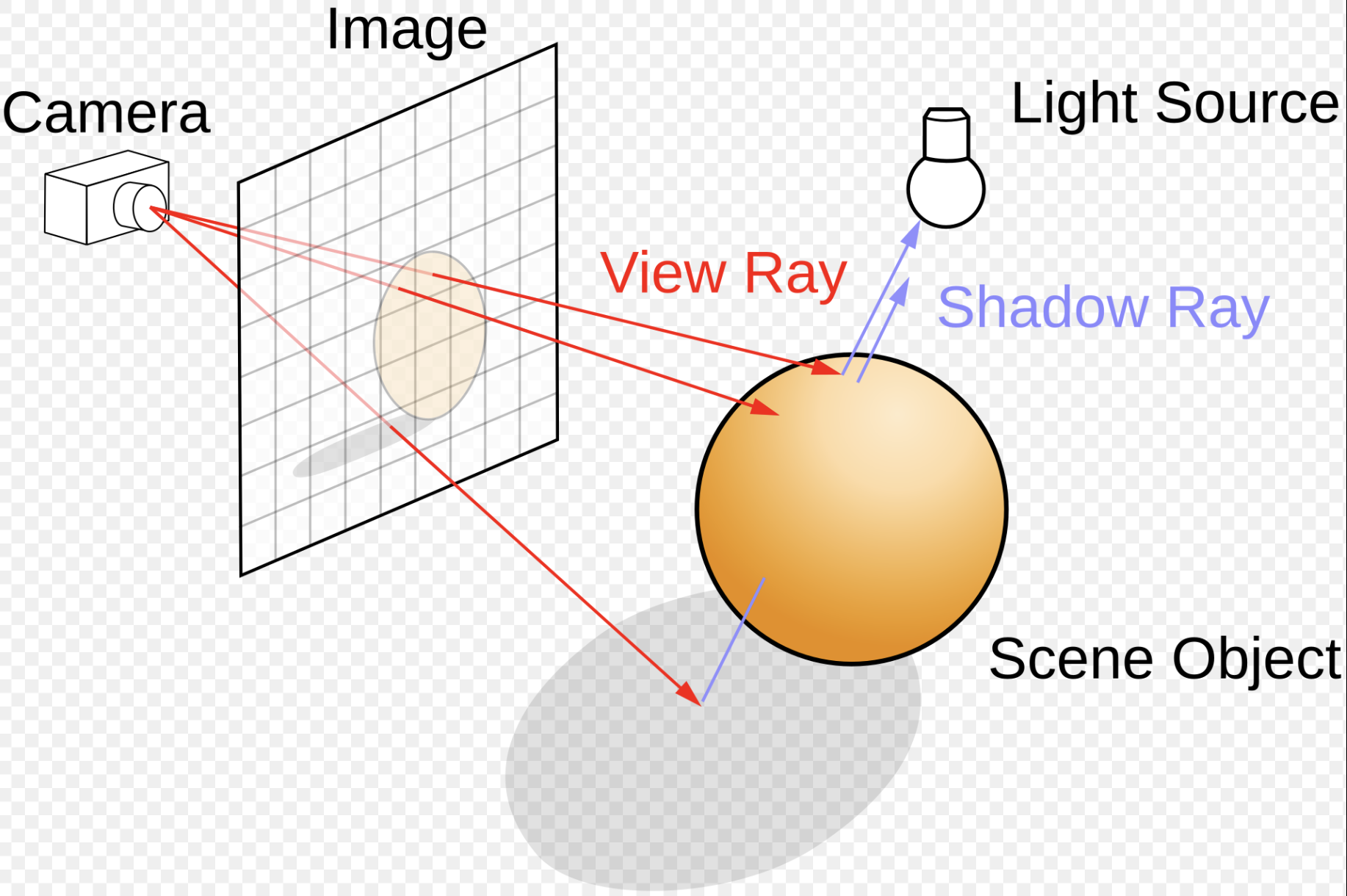
The key conceptual difference between rasterization and ray tracing is the direction of processing.
Rasterization starts from geometry and determines which pixels are covered by each triangle.
Ray tracing starts from pixels and determines which object is visible through each pixel.
Typically, each ray must be tested for intersection with some subset of all the objects in the scene. Once the nearest object has been identified, the algorithm will estimate the incoming light at the point of intersection, examine the material properties of the object, and combine this information to calculate the final color of the pixel [36].
Ray Tracing (Pixel → Object)
Ray tracing reverses this process.
Camera
    │
    ▼
For every pixel
    │
    ▼
Generate Viewing Ray
    │
    ▼
Traverse BVH
    │
    ▼
Find Closest Intersection
    │
    ▼
Evaluate Material
    │
    ▼
Pixel Color
Instead of asking
Which pixels belong to this triangle?
ray tracing asks
What object is visible through this pixel?
Primary Ray Generation
For an image of size
1920 × 1080
the renderer generates approximately
2,073,600
primary rays (one per pixel).
For pixel (x, y):
origin = camera_position

direction =
    normalize(pixel_position - camera_position)
Each ray represents the viewing direction through one screen pixel.
Finding the Visible Object
Suppose the scene contains
Triangle A
Triangle B
Sphere
Floor
The generated ray is tested against the acceleration structure (typically a Bounding Volume Hierarchy, or BVH).
Ray
  │
  ├── Triangle A ?  no
  │
  ├── Triangle B ?  yes
  │        distance = 8.2
  │
  ├── Sphere ?      yes
  │        distance = 15.4
  │
  └── Floor ?       yes
           distance = 32
The closest intersection determines the visible object.
Visible Object = Triangle B
Material Evaluation
Once the closest object is found, its material is evaluated.
For example,
Diffuse Texture
Normal Map
Roughness
Metallic
Emissive
Lighting calculations are then performed similarly to a fragment shader, except that the visible surface was determined by ray intersection instead of rasterization.
Texture Coordinate Interpolation
Each triangle still stores per-vertex attributes.
Vertex 0
    position
    normal
    uv

Vertex 1
    position
    normal
    uv

Vertex 2
    position
    normal
    uv
After the ray intersects the triangle, barycentric coordinates are computed.
For example,
u = 0.2
v = 0.3
w = 0.5
The texture coordinates at the hit point are interpolated as
uv =
    u * uv0 +
    v * uv1 +
    w * uv2
The interpolated texture coordinates are then used to sample textures exactly as in rasterization.
Comparison
Rasterization |
Ray Tracing |
|---|---|
Process one triangle |
Process one pixel |
Triangle → Pixels |
Pixel → Ray |
Rasterizer finds covered pixels |
BVH traversal finds intersected object |
Interpolate vertex attributes |
Interpolate attributes at the hit point |
Sample textures |
Sample textures |
Compute lighting |
Compute lighting |
Write pixel |
Write pixel |
Summary
Ray tracing uses the same geometric and material information as rasterization, including:
Triangle meshes
Vertex normals
Texture coordinates
Materials
Textures
The primary difference lies in how the visible surface is determined.
Rasterization determines visibility by projecting triangles onto the screen and finding the pixels they cover.
Ray tracing determines visibility by casting a viewing ray through each pixel and finding the closest surface intersected by that ray.
After the visible surface has been identified, the remaining shading process (interpolating attributes, sampling textures, and evaluating materials) is very similar to traditional OpenGL fragment shading.
GLSL (GL Shader Language)
OpenGL is a standard specification for designing 2D and 3D graphics and animation in computer graphics. To support advanced animation and rendering, OpenGL provides a large set of APIs (functions) for graphics processing. Popular 3D modeling and animation tools—such as Maya, Blender, and others—can utilize these APIs to handle 3D-to-2D projection and rendering directly on the computer.
The hardware-specific implementation of these APIs is provided by GPU manufacturers, ensuring that rendering is optimized for the underlying hardware.
Background
In the previous section SW Stack and Data Flow described how each frame is generated to display the movement animation or skinning effects using the small animation parameters stored in 3D model and sent from CPU.
Based on description of section SW Stack and Data Flow, we know the animation can be implemented using fixed‑function skinning. The following are the animation examples for shader-less era.
✔ Some consoles and mobile GPUs did have fixed‑function skinning.
✔ In those systems, you could upload bone matrices and let hardware animate vertices.
❌ But you could not change the formulas — only use the built‑in ones.
The following console GPUs did have fixed‑function skinning:
PlayStation 2 (PS2) — VU0/VU1 Microcode
PS2 had fixed hardware instructions for:
skinning
morphing
matrix blending
Developers could upload bone matrices and let the hardware do the blending. No shaders existed yet.
Nintendo GameCube / Wii — XF Unit
The GameCube GPU had a fixed‑function transform unit that supported:
matrix palette skinning (up to 10 matrices)
per‑vertex weighted blending
Again, no shaders — but hardware skinning existed.
The previous section Role and Purpose of Shaders also explained how different visual effects can be achieved by switching shaders and applying different materials across frames.
❌ However the fixed‑function pipeline (OpenGL 1.x / early 2.x without shaders) has:
no per‑vertex programmable math
no access to bone matrices
no ability to blend multiple positions
no ability to apply time‑based deformation
no ability to read custom vertex attributes
no ability to modify vertex positions except via the model‑view matrix
❌ As a result, the shader-less (fixed-function) pipeline in early OpenGL did not support GPU-based skinning. Skinning had to be implemented on the CPU, which imposed limitations on both animation capability and performance, as described below:
Major Disadvantages of a Shader-less (Fixed-Function) Pipeline
No GPU-side animation
Cannot perform skinning, morphing, or procedural deformation on the GPU.
All animation must be computed on the CPU, causing performance bottlenecks.
Limited lighting and materials
Only fixed-function lighting is available.
No custom BRDFs, PBR workflows, toon shading, or stylized effects.
No procedural or time-based effects
Cannot implement UV animation, distortion, dissolve, holograms, or particle effects.
No access to noise functions or time-driven logic in the pipeline.
No post-processing
Motion blur, bloom, depth of field, color grading, and screen-space effects are impossible.
Rigid data flow
Cannot define custom vertex attributes, varyings, or uniform buffers.
Material and animation systems cannot be data-driven.
Poor scalability and performance
CPU must update all animated geometry every frame.
GPU parallelism is unused, limiting scene complexity.
Deprecated and non-portable
Fixed-function pipeline is removed in modern OpenGL core profiles.
Not compatible with contemporary engines or hardware.
✔ All modern consoles (PS5, PS5 Pro, PS6‑class hardware of Sony, Switch 2 of Nintendo) use programmable shader architectures rather than fixed‑function animation hardware. Fixed-function animation is now obsolete.
Sony’s current and upcoming GPUs are based on AMD RDNA architectures, which are fully programmable shader GPUs.
Nintendo’s upcoming Switch 2 uses a custom Nvidia Ampere GPU.
Examples
An OpenGL program typically follows a structure like the example below:
Vertex shader
#version 330 core
layout (location = 0) in vec3 aPos; // the position variable has attribute position 0

out vec4 vertexColor; // specify a color output to the fragment shader

void main()
{
    gl_Position = vec4(aPos, 1.0); // see how we directly give a vec3 to vec4's constructor
    vertexColor = vec4(0.5, 0.0, 0.0, 1.0); // set the output variable to a dark-red color
}
Fragment shader
#version 330 core
out vec4 FragColor;

in vec4 vertexColor; // the input variable from the vertex shader (same name and same type)

void main()
{
    FragColor = computeColorOfThisPixel(...);
}
OpenGL user program
int main(int argc, char ** argv)
{
  // init window, detect user input and do corresponding animation by calling opengl api
  ...
}
The last main() function in an OpenGL application is written by the user, as expected. Now, let’s explain the purpose of the first two main components of the OpenGL pipeline.
As discussed in the Concepts of Computer Graphics textbook, OpenGL provides a rich set of APIs that allow programmers to render 3D objects onto a 2D computer screen. The general rendering process follows these steps:
The user sets up lighting, textures, and object materials.
The system calculates the position of each vertex in 3D space.
The GPU and rendering pipeline automatically determine the color of each pixel based on lighting, textures, and interpolation.
The final image is displayed on the screen by writing pixel colors to the framebuffer.
To give programmers the flexibility to add custom effects or visual enhancements—such as modifying vertex positions for animation or applying unique coloring—OpenGL provides two programmable stages in the graphics pipeline:
Vertex Shader: Allows the user to customize how vertex coordinates are transformed and processed.
Fragment Shader: Allows the user to define how each pixel (fragment) is shaded and colored, enabling effects like lighting, textures, and transparency.
These shaders are written by the user and compiled at runtime, providing powerful control over the rendering process.
OpenGL uses fragment shader instead of pixel is : “Fragment shaders are a more accurate name for the same functionality as Pixel shaders. They aren’t pixels yet, since the output still has to past several tests (depth, alpha, stencil) as well as the fact that one may be using antialiasing, which renders one-fragment-to-one-pixel non-true [30]. Programmer is allowed to add their converting functions that compiler translate them into GPU instructions running on GPU processor. With these two shaders, new features have been added to allow for increased flexibility in the rendering pipeline at the vertex and fragment level [31]. Unlike the shaders example here [32], some converting functions for coordinate in vertex shader or for color in fragment shade are more complicated according the scenes of animation. Here is an example [33]. In wiki shading page [4], Gourand and Phong shading methods make the surface of object more smooth by glsl. Example glsl code of Gourand and Phong shading on OpenGL api are here [34]. Since the hardware of graphic card and software graphic driver can be replaced, the compiler is run on-line meaning driver will compile the shaders program when it is run at first time and kept in cache after compilation [35].
The shaders program is C-like syntax and can be compiled in few mini-seconds, add up this few mini-seconds of on-line compilation time in running OpenGL program is a good choice for dealing the cases of driver software or gpu hardware replacement [37].
Goals
Goals of GLSL Shader Language:
GLSL was designed for real-time graphics using programmable GPUs.
Programmable Pipeline:
Custom control over vertex, fragment, and other pipeline stages
Enables dynamic effects, lighting, animation, and transformations
GPU Acceleration
Executes on GPU cores for massive parallel performance
Optimized for matrix and vector operations common in graphics
Cross-Platform Compatibility:
Runs consistently across OSes and hardware via OpenGL
Avoids vendor lock-in for portable shader code
C-Like Syntax
Familiar syntax for developers used to C-style languages
Supports functions, loops, conditionals, and custom types
Fine-Grained Rendering Control
Direct access to geometry, color, texture, lighting parameters
Enables advanced effects like shadows, fog, reflections
Real-Time Interactivity
Responds to user input, time, and animations at runtime
Suitable for games, simulations, and creative tools
Minimal Host Dependency
Executes within the graphics driver context
No need for external libraries, file I/O, or system calls
GLSL vs. C: Feature Overview
GLSL expands upon C for GPU-based graphics programming.
Additions to C:
Specialized Data Types
vec2, vec3, vec4: float vectors
mat2, mat3, mat4: float matrices
bvec, ivec, uvec, dvec: boolean and integer vectors
sampler2D, samplerCube: texture samplers
Pipeline Qualifiers
attribute, varying (legacy)
in, out, inout: stage and parameter I/O
uniform: uniform variables are set externally by the host application (e.g., OpenGL) and remain constant across all shader invocations for a draw call.
layout(location = x): set GPU variable locations. See Animation Example section.
precision qualifiers: lowp, mediump, highp
Built-in Functions
texture(), reflect(), refract(), normalize()
mix(), smoothstep(): interpolation and blending
dot(), cross(), transpose(), inverse(): math ops
dFdx(), dFdy(), fwidth(): pixel derivatives
Swizzling
.xyzw, .rgba, .stpq access vector components
e.g., vec4 pos = vec3(1, 2, 3).xyzx
Shader-Specific Keywords
discard: drop fragments early
gl_Position, gl_FragColor, gl_VertexID: built-ins
subroutine, patch, sample: advanced pipeline control
Removals and Restrictions:
No Pointers or Memory Access
No * or & operators
No malloc, free
No File I/O or Standard C Libs
No stdio.h, printf(), fopen()
No Recursion
Recursive functions not allowed
No #include Support
Files can’t be included via preprocessor
Limited Control Flow
goto not allowed
Loops must be statically determinable in many cases for compiler optimization as follows:
Example for loops must be statically determinable in many cases
const int MAX_LIGHTS = 10;
for (int i = 0; i < MAX_LIGHTS; ++i) {
  // Safe: MAX_LIGHTS is a compile-time constant
}
Restricted C Keywords
typedef, union, enum, class, namespace, inline, etc.
Reserved or disallowed
Notes:
Changes help GPU execute safely in parallel
Designed for real-time, interactive graphics
GLSL Qualifiers by Shader Stage
The CPU and GPU Pipeline For Shaders is introduced in section 3D Rendering Pipeline. The Fig. 54 is the summary of GLSL Qualifiers below.
![digraph CPU_GPU_Pipeline {
rankdir=LR;
node [shape=box, style=rounded, fontsize=12];
subgraph cluster_cpu {
label="CPU";
style=rounded;
CPU_Vertex [label="Load 3D Model\n(Per-Vertex Attributes)\nVBOs, VAOs, Indices"];
CPU_Anim [label="Uniform Updates\n(Animation Parameters,\nMatrices, Lighting,\nMaterial Parameters)"];
}
subgraph cluster_gpu {
label="GPU";
style=rounded;
VS [label="Vertex Shader\nInputs:\n - Vertex Attributes (in)\n - Uniforms (matrices, animation)\nOutputs:\n - Varyings → Rasterizer"];
Raster [label="Rasterizer\n(Primitive Assembly,\nClipping, Interpolation)\nOutputs:\n - Interpolated Varyings"];
FS [label="Fragment Shader\nInputs:\n - Interpolated Data (in)\n - Uniforms (textures, lighting)\nOutputs:\n - Final Fragment Color"];
FB [label="Framebuffer\n(Final Rendered Image)"];
CS [label="Compute Shader\n(Workgroups, SSBOs,\nImages, Shared Memory)\nIndependent of the VS→FS Pipeline"];
}
# Main graphics pipeline
CPU_Vertex -> VS;
CPU_Anim -> VS;
VS -> Raster;
Raster -> FS;
FS -> FB;
# Compute shader is dispatched separately
CPU_Anim -> CS [style=dashed, label="Dispatch Compute"];
}](_images/graphviz-3e463c735560da1d98c3a9103d5ebd09f4a12e2f.png)
Fig. 54 Shaders input and output
Vertex Shader:
in: Receives per-vertex attributes from buffer objects, it is 3D Model Information described in Fig. 54.
out: Passes data to next stage (e.g., fragment shader)
uniform: Global parameters like matrices or lighting, it is Animation Parameters, also referred to as Uniform Updates described in Fig. 54. The Animation Example section provides an example in Vertex Shader (VS) that demostrates animation using both the 3D model information and Uniform Updates.
layout(location = x): Binds input/output to attribute index. See Animation Example section.
const: Compile-time constants
Cannot use interpolation qualifiers on inputs
Fragment Shader:
in: Receives interpolated data from previous stage as shown in Fig. 54.
out: Writes Final Fragement Color to FrameBuffer
uniform: Global parameters like textures or lighting as shown in Fig. 54. Uniform data remains unchanged across all pipeline stages and is shared by all shaders in the pipeline. This means that uniform data represents global parameters for 3D GPU rendering.
flat: Disables interpolation; uses provoking vertex
smooth: Enables perspective-correct interpolation (default); noperspective: Use Linear interpolation in screen space instead of “smooth” option.
centroid: Samples within primitive area (for multisampling)
sample: Per-sample interpolation (GLSL 4.0+)
discard: Terminates fragment processing early
Compute Shader:
layout(local_size_x = x): Defines workgroup size
uniform: Input parameters from host
buffer: Shader storage buffer access
shared: Shared memory among invocations in a workgroup
image2D, image3D: Direct image access
coherent, volatile, restrict: Memory access control
readonly, writeonly: Access mode for image/buffer
Compute shader: may be applied in any stage as described in section 3D Rendering Pipeline.
Common Across Stages:
const: Immutable values
uniform: Host-set global parameters
layout(binding = x): Bind uniform/buffer/image to index
precise: Ensures consistent computation
invariant: Prevents variation across shader executions
Notes:
attribute and varying are deprecated (use in/out instead)
Interpolation qualifiers only affect fragment shader inputs
Uniforms are shared across all stages and remain constant
Examples of GLSL Qualifiers by Shader Stage
// ==============================================
// Vertex Shader: Qualifier Summary (GLSL)
// ==============================================

// Vertex inputs
layout(location = 0) in vec3 aPosition;   // in: per-vertex attribute
layout(location = 1) in vec3 aNormal;

// Outputs to fragment shader
out vec3 vNormal;                         // out: passes to next stage

// Uniforms
uniform mat4 uModelMatrix;               // uniform: global parameter
uniform mat4 uViewProjectionMatrix;

// Constants
const float PI = 3.14159265;             // const: compile-time constant

void main() {
  vNormal = aNormal;
  gl_Position = uViewProjectionMatrix * uModelMatrix * vec4(aPosition, 1.0);
}

// ==============================================
// Fragment Shader: Qualifier Summary (GLSL)
// ==============================================

// Inputs from vertex shader
in vec3 vNormal;                          // in: interpolated input

// Output to framebuffer
out vec4 fragColor;                       // out: final pixel color

// Uniforms
uniform vec3 uLightDirection;            // uniform: shared global input
uniform vec3 uBaseColor;

// Interpolation control
// flat in vec3 vFlatColor;              // flat: no interpolation
// smooth in vec3 vSmoothColor;         // smooth: default interpolation
// noperspective in vec3 vLinearColor;  // noperspective: screen-space linear

void main() {
  float brightness = max(dot(normalize(vNormal), uLightDirection), 0.0);
  fragColor = vec4(uBaseColor * brightness, 1.0);
}

// ==============================================
// Compute Shader: Qualifier Summary (GLSL)
// ==============================================

#version 430

// Workgroup size
layout(local_size_x = 16, local_size_y = 16) in;

// Shared memory
shared float tileData[256];              // shared: intra-group memory

// Uniforms
uniform float uTime;                     // uniform: global input

// Buffer access
layout(std430, binding = 0) buffer DataBuffer {
  float values[];
};

// Image access
layout(binding = 1, rgba32f) uniform image2D uImage;

// Memory qualifiers
// coherent, volatile, restrict, readonly, writeonly

void main() {
  uint idx = gl_GlobalInvocationID.x;
  values[idx] += sin(uTime);           // buffer write
  imageStore(uImage, ivec2(idx, 0), vec4(values[idx])); // image write
}
OpenGL Buffers
CPU and GPU provides different Buffers to speedup OpenGL pipeline rendering [16].
Buffer Type |
Access |
Location |
API/Usage |
Function |
Description |
|---|---|---|---|---|---|
Vertex Buffer (VBO) |
Read |
GPU |
OpenGL, Vulkan |
Store vertex attributes |
Holds data like position, normal, and texture coords for drawing geometry. |
Index Buffer (IBO/EBO) |
Read |
GPU |
OpenGL, Vulkan |
Reuse vertex data |
Stores indices into the vertex buffer to avoid duplication. |
Uniform Buffer (UBO) |
Read |
GPU or Shared |
OpenGL, Vulkan |
Constant input data |
Shares transformation matrices, lighting, or material data across shaders. |
Shader Storage Buffer (SSBO) |
Read/Write |
GPU or Shared |
OpenGL, Vulkan |
General data exchange |
Flexible, large buffers accessible for structured shader I/O. |
Constant Buffer |
Read |
GPU or Shared |
DirectX, Vulkan |
Fast uniform access |
Optimized for fast access to frequently read small data. |
Image / Texture Buffer |
Read/Write |
GPU |
OpenGL, Vulkan |
Sample/store pixels |
Stores image data for sampling or read/write image operations in shaders. |
Color Buffer |
Write |
GPU |
OpenGL, Vulkan |
Store final pixel color |
Stores output of fragment shaders; used for display or post-processing. |
Depth Buffer (Z-Buffer) |
Write/Read |
GPU |
OpenGL, Vulkan |
Visibility testing |
Stores per-pixel depth values for hidden surface removal. |
Frame Buffer |
Write |
GPU |
OpenGL, Vulkan |
Store render output |
Holds final color, depth, or other rendered output. |
Stencil Buffer |
Read/Write |
GPU |
OpenGL, Vulkan |
Pixel masking |
Used to conditionally discard or preserve pixels in the pipeline. |
✅ Uniforms, UBOs, and SSBOs
This section explains the three major data‑passing mechanisms in OpenGL:
uniform variables, Uniform Buffer Objects (UBOs), and
Shader Storage Buffer Objects (SSBOs). They differ in storage location,
capacity, access rules, and intended usage.
Uniform (Default Uniform Block)
A uniform is a small piece of read‑only data provided to shaders. Examples:
uniform mat4 view;
uniform vec3 lightPos;
uniform float exposure;
Characteristics:
Stored inside the Default Uniform Block of the program object.
Managed entirely by the OpenGL driver.
Updated using
glUniform*functions.Not a GPU buffer object.
Not mappable and not shareable across programs.
Uses opaque, driver‑defined layout rules.
Best suited for small parameters such as scalars, vectors, and matrices.
Typical size limit: approximately 16 KB (implementation dependent).
Uniform Buffer Object (UBO)
A Uniform Buffer Object stores uniforms declared inside a named uniform block:
layout(std140) uniform Camera {
    mat4 view;
    mat4 proj;
    vec3 eyePos;
};
UBOs are real GPU buffer objects allocated by the application:
glGenBuffers(1, &ubo);
glBindBuffer(GL_UNIFORM_BUFFER, ubo);
glBufferData(GL_UNIFORM_BUFFER, size, data, GL_STATIC_DRAW);
Characteristics:
Lives in GPU VRAM as a buffer object.
Read‑only in shaders.
Uses
std140orstd430structured layouts.Bindable to buffer binding points.
Shareable across multiple shader programs.
Mappable and updatable through buffer APIs.
Typically limited to about 64 KB per block due to hardware constant‑cache constraints.
Best suited for medium‑sized structured data such as camera matrices, lighting parameters, and per‑frame or per‑pass data.
Shader Storage Buffer Object (SSBO)
A Shader Storage Buffer Object is a general‑purpose GPU buffer accessible for both reading and writing from shaders:
layout(std430, binding = 0) buffer Storage {
    vec4 positions[];
};
SSBOs are allocated similarly to other buffer objects:
glBindBuffer(GL_SHADER_STORAGE_BUFFER, ssbo);
glBufferData(GL_SHADER_STORAGE_BUFFER, size, nullptr, GL_DYNAMIC_COPY);
Characteristics:
Lives in GPU VRAM as a buffer object.
Readable and writable from shaders.
Supports very large sizes (hundreds of megabytes).
Uses
std430layout for compact packing.Suitable for compute workloads, GPU‑driven rendering, and large dynamic datasets.
Best suited for large arrays, particle systems, visibility buffers, and any data too large or too dynamic for UBOs.
Comparison Table
The following table summarizes the differences:
Feature |
Uniform |
UBO |
SSBO |
|---|---|---|---|
Storage |
Program object |
GPU buffer |
GPU buffer |
Access |
Read‑only |
Read‑only |
Read/write |
Update |
|
Buffer update |
Buffer update |
Layout |
Opaque |
std140/std430 |
std430 |
Max size |
~16 KB |
~64 KB |
Very large (MBs) |
Share across programs |
No |
Yes |
Yes |
Shader write |
No |
No |
Yes |
Best for |
Small parameters |
Medium structured data |
Large dynamic data |
✅ std140 and std430 Layout Rules
OpenGL defines two major memory layout standards for uniform and storage
buffer blocks: std140 and std430. These rules determine how GLSL
types are aligned and padded inside uniform blocks (UBOs) and
buffer blocks (SSBOs). Understanding these layouts is essential for
correctly matching GPU-side GLSL structures with CPU-side data structures.
Std140 is more performance-efficient and std430 is more memory‑efficient.
std140 Layout
std140 is the default layout for uniform blocks and is designed
for compatibility with older hardware. It enforces strict alignment and
padding rules to ensure predictable access through the GPU’s constant
cache.
Key properties:
Scalars (
float,int) have 4‑byte alignment.vec2has 8‑byte alignment.vec3andvec4both have 16‑byte alignment.Matrices are stored as arrays of column vectors, each column aligned to 16 bytes.
Arrays have a stride of 16 bytes per element, regardless of element type.
Structs are padded so that each member follows the above rules, and the struct itself is aligned to 16 bytes.
Example:
layout(std140) uniform Camera {
    mat4 view;     // 64 bytes
    mat4 proj;     // 64 bytes
    vec3 eyePos;   // 16 bytes (vec3 padded to vec4)
    float exposure; // 4 bytes, but padded to 16 bytes
};
std140 is predictable but often wastes memory due to padding.
std430 Layout
std430 is the default layout for buffer blocks (SSBOs) and is
designed for modern GPUs. It relaxes many of the padding rules found in
std140 and allows tighter packing of data.
Key properties:
Scalars have 4‑byte alignment.
vec2has 8‑byte alignment.vec3andvec4have 16‑byte alignment (same as std140).Arrays use the natural alignment of their element type (no forced 16‑byte stride).
Structs follow natural alignment rules without extra padding beyond what each member requires.
Matrices are still stored as arrays of column vectors, but column alignment follows natural rules.
Example:
layout(std430, binding = 0) buffer Storage {
    vec4 positions[];  // tightly packed array of vec4
};
std430 is more memory‑efficient and is preferred for large datasets
such as particle systems, mesh data, and compute workloads.
Comparison Table
Feature |
std140 |
std430 |
|---|---|---|
Used in |
UBOs (uniform blocks) |
SSBOs (buffer blocks) |
Padding |
Heavy |
Minimal |
Array stride |
Always 16 bytes |
Natural alignment |
Struct alignment |
16 bytes |
Natural alignment |
Best for |
Small uniform data |
Large dynamic data |
Summary
std140provides strict, predictable alignment for uniform blocks, but often wastes memory.std430provides compact, efficient layouts for storage buffers, ideal for large arrays and compute workloads.Both layouts ensure that CPU-side data structures can be matched reliably with GPU-side GLSL declarations.
Color buffer
They contain the RGB or sRGB color data and may also contain alpha values for each pixel in the framebuffer. There may be multiple color buffers in a framebuffer. You’ve already used double buffering for animation. Double buffering is done by making the main color buffer have two parts: a front buffer that’s displayed in your window; and a back buffer, which is where you render the new image [17].
Depth buffer (Z buffer)
Depth is measured in terms of distance to the eye, so pixels with larger depth-buffer values are overwritten by pixels with smaller values [18] [19] [20].
Frame Buffer
OpenGL offers: the color, depth and stencil buffers. This combination of buffers is known as the default framebuffer and as you’ve seen, a framebuffer is an area in memory that can be rendered to [21].
Stencil Buffer
In the simplest case, the stencil buffer is used to limit the area of rendering (stenciling) [22] [20].
Buffer Type |
Access |
Location |
API/Usage |
Function |
Description |
|---|---|---|---|---|---|
Compute Buffer |
Read/Write |
GPU or Shared |
OpenCL, Vulkan, CUDA |
Parallel compute data |
Buffers used in compute kernels or shaders for general processing. |
Atomic Buffer |
Read/Write (Atomic) |
GPU |
OpenGL, Vulkan |
Shared counters/data |
Used with atomic ops for synchronization or accumulation. |
Acceleration Structure Buffer |
Read |
GPU |
Vulkan RT, DXR |
Ray tracing acceleration |
Holds spatial hierarchy (BVH) for ray traversal efficiency. |
Indirect Draw Buffer |
Read |
GPU |
Vulkan, DirectX |
GPU-issued draw |
Stores draw/dispatch args to issue commands without CPU. |
DXR: DirectX Raytracing — a D3D12 extension for real-time ray tracing using GPU acceleration.
Indirect Draw Buffer: A GPU-side buffer holding draw parameters so that GPU (not CPU) can issue rendering work dynamically.
Buffer Type |
Access |
Location |
API/Usage |
Function |
Description |
|---|---|---|---|---|---|
Command Buffer |
Write (CPU) / Read (GPU) |
Host → GPU |
Vulkan, DirectX12 |
Submit work |
Encapsulates commands like draw, dispatch, and memory ops. |
Parking / Staging Buffer |
Read/Write |
Host-visible |
Vulkan, CUDA |
Temporary transfer |
Temporary CPU-visible buffer for uploading/downloading GPU data. |
OpenGL Shader Compiler
The OpenGL standard is defined in [38]. OpenGL is primarily designed for desktop computers and servers, whereas OpenGL ES is a subset tailored for embedded systems [39].
Although shaders represent only a small part of the entire OpenGL software/hardware stack, implementing a compiler for them is still a significant undertaking. This is because a large number of APIs need to be supported. For instance, there are over 80 texture-related APIs alone [40].
A practical approach to implementing such a compiler involves generating LLVM extended intrinsic functions from the shader frontend (parser and AST generator). These intrinsics can then be lowered into GPU-specific instructions in the LLVM backend. The overall workflow is illustrated as follows:
Fragment shader
#version 320 es
uniform sampler2D x;
out vec4 FragColor;

void main()
{
    FragColor = texture(x, uv_2d, bias);
}
llvm-ir
...
!1 = !{!"sampler_2d"}
!2 = !{i32 SAMPLER_2D} ; SAMPLER_2D is integer value for sampler2D, for example: 0x0f02
; A named metadata.
!x_meta = !{!1, !2}

define void @main() #0 {
    ...
    %1 = @llvm.gpu0.texture(metadata !x_meta, %1, %2, %3); ; %1: %sampler_2d, %2: %uv_2d, %3: %bias
    ...
}
asm of gpu
...
// gpu machine code
load $1, tex_a;
sample2d_inst $1, $2, $3 // $1: tex_a, $2: %uv_2d, $3: %bias

.tex_a // The driver sets the GPU descriptor-register index here
As shown at the end of the code above, the .tex_a memory address contains the Texture Object, which is bound by the driver during online compilation and linking. By binding a Texture Object (software representation) to a Texture Unit (hardware resource) via OpenGL API calls, the GPU can access and utilize Texture Unit hardware efficiently. This binding mechanism ensures that texture sampling and mapping are executed with minimal overhead during rendering.
For more information about LLVM extended intrinsic functions, please refer to [41].
gvec4 texture(gsampler2D sampler, vec2 P, [float bias]);
GPUs provide Texture Units to accelerate texture access in fragment shaders. However, Texture Units are expensive hardware resources, and only a limited number are available on a GPU. To manage this limitation, the OpenGL driver can associate a Texture Unit with a sampler variable using OpenGL API calls. This association can be updated or switched between shaders as needed. The following statements demonstrate how to bind and switch Texture Units across shaders:
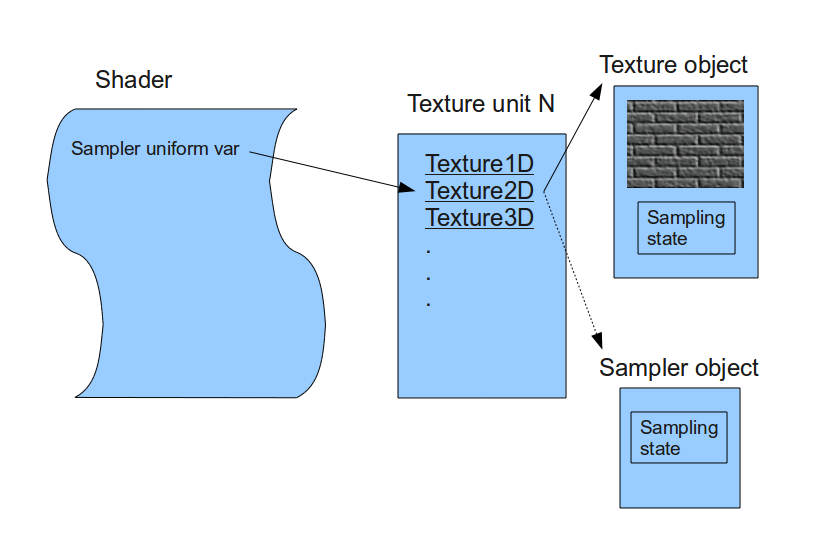
As shown in Fig. 55, the texture object is not bound directly to a shader (where sampling operations occur). Instead, it is bound to a texture unit, and the index of this texture unit is passed to the shader. This means the shader accesses the texture object through the assigned texture unit. Most GPUs support multiple texture units, though the exact number depends on the hardware capabilities [42].
A texture unit—also known as a Texture Mapping Unit (TMU) or Texture Processing Unit (TPU)— is a dedicated hardware component in the GPU that performs texture sampling operations.
The sampler argument in the texture sampling function refers to a sampler2D (or similar) uniform variable. This variable represents the texture unit index used to access the associated texture object [42].
Sampler Uniform Variables:
OpenGL provides a set of special uniform variables for texture sampling, named according to the texture target: sampler1D, sampler2D, sampler3D, samplerCube, etc.
You can create as many sampler uniform variables as needed and assign each one to a specific texture unit index using OpenGL API calls. Whenever a sampling function is invoked with a sampler uniform, the GPU uses the texture unit (and its bound texture object) associated with that sampler [42].
For Java programmers, JOGL provides same level of API in Java for wrapping to OpenGL C API. As shown in Fig. 56, the JOGL gl.bindTexture() binds a Texture Object to a specific Texture Unit. Then, using gl.getUniformLocation() and gl.uniform1i(), you associate the Texture Unit with a sampler uniform variable in the shader.
For example, gl.uniform1i(xLoc, 1) assigns Texture Unit 1 to the sampler variable at location xLoc. Similarly, passing 2 would refer to Texture Unit 2, and so on [43].
The following Fig. 57 illustrates how the OpenGL driver reads metadata from a compiled GLSL object, how the OpenGL API links sampler uniform variables to Texture Units, and how the GPU executes the corresponding texture instructions.
![digraph G {
graph [rankdir=TB];
// ---------------------
// Node n1, n2, n3, n4
// ---------------------
n1 [shape=box, label="1. GPU Compiler"];
n2 [shape=box, label="2. Driver allocates storage for xLoc"];
n3 [shape=box, label="3. xLoc = gl.getUniformLocation(prog, \"x\")"];
n4 [shape=box, label="4. gl.uniform1i(xLoc, 1)"];
// -------------------------
// Table 1 (tbl1)
// -------------------------
tbl1 [
shape=none
label=<
<TABLE BORDER="1" CELLBORDER="1" CELLSPACING="0">
<TR><TD COLSPAN="3"><B>Driver Sampler-Variable Table</B></TD></TR>
<TR>
<TD PORT="r0c0">name</TD>
<TD PORT="r0c1">type</TD>
<TD PORT="r0c2">location</TD>
</TR>
<TR>
<TD PORT="r1c0">...</TD>
<TD PORT="r1c1"></TD>
<TD PORT="r1c2"></TD>
</TR>
<TR>
<TD PORT="r2c0">"x"</TD>
<TD PORT="r2c1">sampler2D</TD>
<TD PORT="r2c2">xLoc</TD>
</TR>
<TR>
<TD PORT="r3c0">...</TD>
<TD PORT="r3c1"></TD>
<TD PORT="r3c2"></TD>
</TR>
</TABLE>
>
];
// -------------------------
// Table 2 (tbl2)
// -------------------------
tbl2 [
shape=none
label=<
<TABLE BORDER="1" CELLBORDER="1" CELLSPACING="0">
<TR><TD COLSPAN="4"><B>Texture Descriptor Table</B></TD></TR>
<TR>
<TD PORT="t0c0">offset</TD>
<TD PORT="t0c1">location</TD>
<TD PORT="t0c2">Texture Unit</TD>
</TR>
<TR>
<TD PORT="t1c0">...</TD>
<TD PORT="t1c1"></TD>
<TD PORT="t1c2"></TD>
</TR>
<TR>
<TD PORT="t2c0">k</TD>
<TD PORT="t2c1">xLoc</TD>
<TD PORT="t2c2">1</TD>
</TR>
<TR>
<TD PORT="t3c0">...</TD>
<TD PORT="t3c1"></TD>
<TD PORT="t3c2"></TD>
</TR>
</TABLE>
>
];
// -------------------------
// Table 3 (tbl3)
// -------------------------
tbl3 [
shape=none
label=<
<TABLE BORDER="1" CELLBORDER="1" CELLSPACING="0">
<TR><TD COLSPAN="3"><B>GPU executable binary</B></TD></TR>
<TR>
<TD PORT="u0c0" ALIGN="LEFT">4. load $1, tex_a</TD>
</TR>
<TR>
<TD PORT="u1c0" ALIGN="LEFT"> sample_inst $1, $2, $3 // $2: %uv_2d, $3: %bias</TD>
</TR>
<TR>
<TD PORT="u2c0" ALIGN="LEFT"> .tex_a // Driver sets the value to k when gl.uniform1i(xLoc, 1) is called</TD>
</TR>
</TABLE>
>
];
// -------------------------
// Edges
// -------------------------
// n1 -> n2 -> tbl1(2,2)
n1 -> n2 [label="Linking a uniform sampler2D x"];
n2 -> tbl1:r2c2;
// tbl1(2,2) -> n3
tbl1:r2c2 -> n3;
n3 -> tbl2:t2c1 [label="Driver records xLoc\n(the location of sampler x)\nat offset k in the table"];
// n4 -> right side of tbl2 (choose last column: row 2 col 2)
n4 -> tbl2:t2c2 [label="Driver writes 1 to the table\nto select Texture Unit 1"];
// tbl2(2,0) -> tb3(2,0)
tbl2:t2c0 -> tbl3:u2c0 [label="Driver looks up the table and\nsets the symbol '.tex_a' to k\nin the executable binary"];
}](_images/graphviz-43d94cab37ed65e8c646a03b57e2aa1912b3f83e.png)
Fig. 57 Binding Sampler Variables to Texture Instructions
Explaining the detailed steps for the figure above:
To enable the GPU driver to bind the texture unit, the frontend compiler must pass metadata for each sampler uniform variable (e.g., sampler_2d_var in this example) [44] to the backend. The backend then allocates and embeds this metadata in the compiled binary file [45].
During the link stage of on-line compilation of the GLSL shader, the GPU driver reads this metadata from the compiled binary file. It constructs an internal table mapping each sampler uniform variable to its attributes, such as {name, type, location}. This mapping allows the driver to properly populate the Texture Descriptor in the GPU’s memory, linking the variable to a specific texture unit.
API:
xLoc = gl.getUniformLocation(prog, "x"); // prog: GLSL program, xLoc: location of sampler variable "x"
This API call queries the location of the sampler uniform variable named “x” from the internal table that the driver created after parsing the shader metadata.
The returned xLoc value corresponds to the location field associated with “x”, which will later be used to bind a specific texture unit to this sampler variable via gl.uniform1i(xLoc, unit_index).
SAMPLER_2D is the internal representation (usually an integer) that identifies a sampler2D type in the shader.
API:
gl.uniform1i(xLoc, 1);
This API call binds the sampler uniform variable x (located at xLoc) to Texture Unit 1. It works by writing the integer value 1 to the internal GLSL program memory at the location of the sampler variable x, as indicated by xLoc.
{xLoc, 1} : 1 is 'Texture Unit 1', xLoc is the memory address of 'sampler uniform variable' x
After this call, the OpenGL driver updates the Texture Descriptor table in GPU memory with this {xLoc, 1} information.
Next, the driver associates the memory address or index of the GPU’s texture descriptor with a hardware register or pointer used during fragment shader execution. For example, as shown in the diagram, the driver may write a pointer k to the .tex_a field in memory.
This .tex_a address is used by the GPU to locate the correct Texture Unit and access the texture object during shader execution.
// gpu machine code
load $1, tex_a;
sample2d_inst $1, $2, $3 // $1: tex_a, $2: %uv_2d, $3: %bias

.tex_a // The driver sets the GPU descriptor-register index here at step 4
When the GPU executes texture instructions from a GLSL binary, the corresponding
texture unit is selected through a texture descriptor in GPU memory. In this
example, .tex_a refers to {xLoc, 1}. If the architecture provides
dedicated texture descriptors, the driver writes the descriptor into the
descriptor table [46].
For example, an NVIDIA texture instruction is as follows:
// the content of tex_a bound to texture unit as step 5 above
tex.3d.v4.s32.s32  {r1,r2,r3,r4}, [tex_a, {f1,f2,f3,f4}];

.tex_a
The content of tex_a bound to texture unit set by driver as the end of step 4. The pixel of coordinates (x,y,z) is given by (f1,f2,f3) user input. The f4 is skipped for 3D texture.
Above tex.3d texture instruction load the calculated color of pixel (x,y,z) from texture image into GPRs (r1,r2,r3,r4)=(R,G,B,A). And fragment shader can re-calculate the color of this pixel with the color of this pixel at texture image [47].
If it is 1d texture instruction, the tex.1d as follows,
GPU Execution of Texture Instruction
// GPU machine code
load $1, tex_a;
sample2d_inst $1, $2, $3  // $1: tex_a, $2: %uv_2d, $3: %bias

.tex_a // Set by driver to index of GPU descriptor at step 4
When the GPU executes the texture sampling instruction (e.g., sample2d_inst), it uses the .tex_a address, which was assigned by the driver in step 4, to access the appropriate Texture Descriptor from GPU memory. This descriptor corresponds to Texture Unit 1 because of the earlier API call:
gl.uniform1i(xLoc, 1);
If the GPU hardware provides dedicated texture descriptor registers or memory structures, the driver maps .tex_a to those structures [46].
Example (NVIDIA PTX texture instruction):
// The content of tex_a is bound to a texture unit, as in step 4
tex.3d.v4.s32.s32 {r1,r2,r3,r4}, [tex_a, {f1,f2,f3,f4}];

.tex_a
Here, the .tex_a register holds the texture binding information set by the driver. The vector {f1, f2, f3} represents the 3D coordinates (x, y, z) provided by the shader or program logic. The f4 value is ignored for 3D textures.
This tex.3d instruction performs a texture fetch from the bound 3D texture and loads the resulting color values into general-purpose registers:
r1: Red
r2: Green
r3: Blue
r4: Alpha
The fragment shader can then use or modify this color value based on further calculations or blending logic [47].
If a 1D texture is used instead, the texture instruction would look like:
// For compatibility with prior versions of PTX, the square brackets are not
// required and .v4 coordinate vectors are allowed for any geometry, with
// the extra elements being ignored.
tex.1d.v4.s32.f32  {r1,r2,r3,r4}, [tex_a, {f1}];
Since the ‘Texture Unit’ is a limited hardware accelerator on the GPU, OpenGL provides APIs that allow user programs to bind ‘Texture Units’ to ‘Sampler Variables’. As a result, user programs can balance the use of ‘Texture Units’ efficiently through OpenGL APIs without recompiling GLSL. Fast texture sampling is one of the key requirements for good GPU performance [43].
In addition to the API for binding textures, OpenGL provides the
glTexParameteri API for texture wrapping [48]. Furthermore, the
texture instruction for some GPUs may include S# and T# values in the operands.
Similar to associating ‘Sampler Variables’ to ‘Texture Units’, S# and T# are
memory locations associated with texture wrapping descriptor registers. This
allows user programs to change wrapping options without recompiling GLSL.
Even though the GLSL frontend compiler always expands function calls into inline functions, and LLVM intrinsic extensions provide an easy way to generate code through LLVM’s target description (TD) files, the GPU backend compiler is still somewhat more complex than the CPU backend.
(However, considering the effort required for the CPU frontend compiler such as Clang, or toolchains like the linker and GDB/LLDB, the overall difficulty of building a CPU compiler is not necessarily less than that of a GPU compiler.)
Here is the software stack of the 3D graphics system for OpenGL on Linux [5]. The Mesa open source project website is here [49].